Mixpost vs Postiz: Better Option for Social Media Posting?
Mixpost vs Postiz: one free tier is the whole social media tool, the other is three platforms. Plus MIT vs AGPL and the real cost of self-hosting.

Mixpost vs Postiz looks like a coin flip until you find out what each one means by “free.” Postiz self-hosted hands you the entire product: every platform, the API, MCP, AI generation, nothing held back. Mixpost’s free Lite edition hands you three destinations, Facebook Pages, X and Mastodon, and puts Instagram behind a $299 license.
That is the fact that decides this for most people, and it is buried on both websites.
If you have already decided Mixpost is not the one and want the wider field, we lined up what else self-hosts or replaces it separately. The other decider here is a line of legal text. Mixpost’s free edition ships under MIT, Postiz under AGPL-3.0. If you intend to build anything commercial on top, that clause outranks every feature row below.
Blotato, a hosted tool in this category, is an app I built, so factor that in from the start. The first two thirds of this is about choosing between these two, including the parts where hosted tools like mine are the wrong answer.
Mixpost vs Postiz: At a Glance
Reach for Mixpost when the AGPL scares your lawyer, when you would rather pay $299 once than $29 every month, or when your team writes Laravel and wants source they can actually modify.
Reach for Postiz when you want every feature free on your own hardware, when your audience sits on Discord, Telegram or Mastodon, or when you want a hosted escape hatch if maintenance stops being fun.
Both answers assume a server you maintain. If that assumption is the thing you are actually questioning, see what a managed plan covers, and I will be specific later about when it is the wrong call.
Two Self-Hosted Tools With Different Licenses
Closer than most pairs, but they are built by different kinds of teams for different kinds of buyers.
Postiz is a TypeScript and Node application with an agentic bent. The marketing leads with AI copilots, a smart agent, and a CLI. It self-hosts under AGPL-3.0 through Docker, and there is a hosted cloud plan if you decide the servers are not worth it. The project has passed 35,000 GitHub stars since mid-2023.
Mixpost is a Laravel package built by Inovector, and it self-hosts only. There is no Mixpost cloud, and that is deliberate. The pitch is data ownership: your drafts, tokens and media sit on hardware you control rather than a vendor’s, publishing aside. It sits around 3,700 stars with a repo dating to 2022.
The structural difference is how each one splits free from paid. Postiz splits by hosting: run it yourself and you get everything, or pay to have it run for you. Mixpost splits by edition: Lite is free and deliberately limited, Pro is $299 and unlocks the product. Same “open source” label, different meaning.

Mixpost’s Audience: A One-Time License, Self-Run
Mixpost is built for agencies, privacy-sensitive businesses and Laravel developers. The one-time purchase is unusual enough here to be the main reason people pick it.
Three editions on the pricing page. Lite is free and MIT-licensed. Pro is $299 one-time and adds every platform, the API, MCP, the AI assistant, approval flows, white labeling and multi-tenant workspaces. Enterprise is $1,199 and adds the subscription management and billing a Pro license explicitly does not permit.
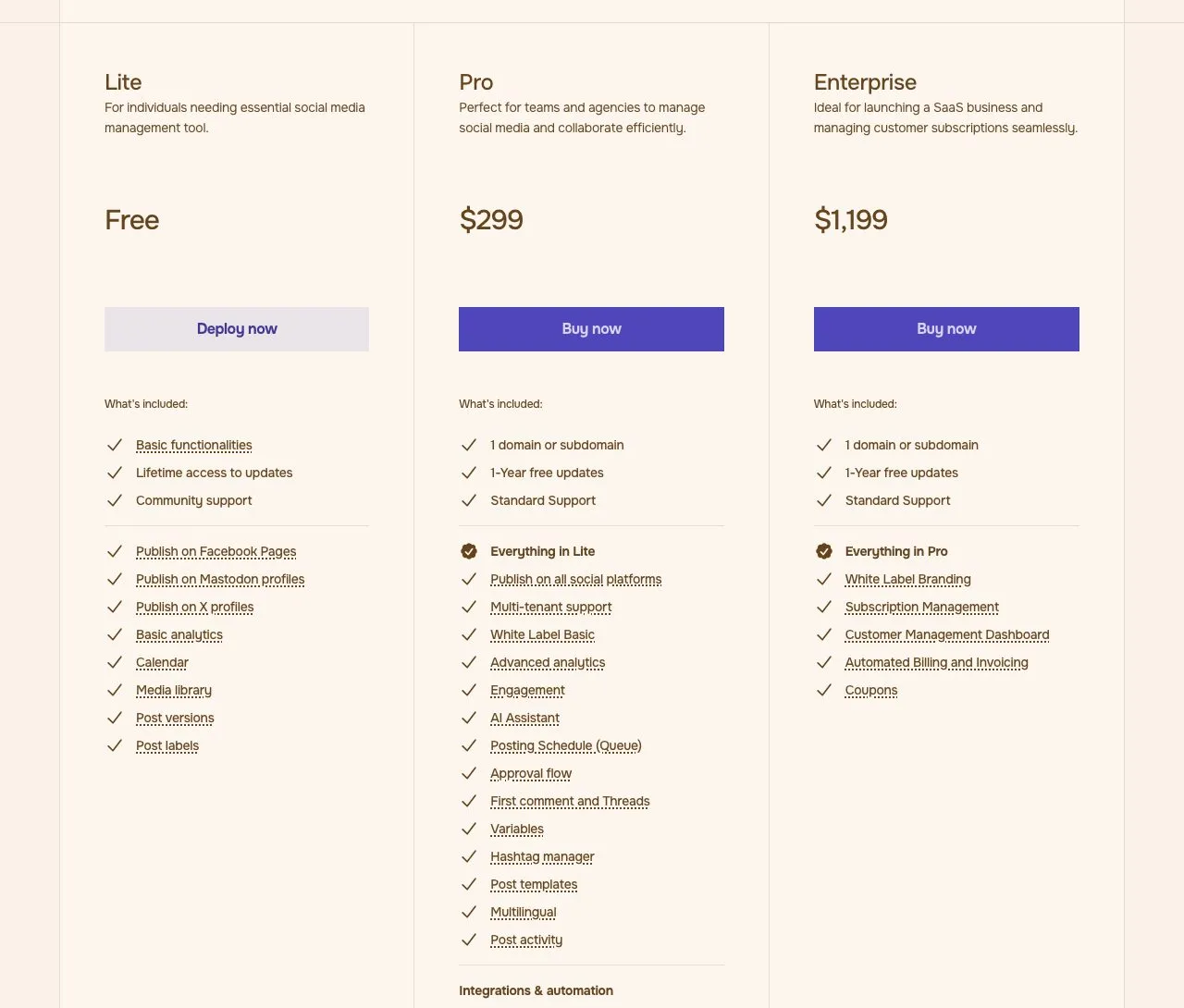
Two details are easy to misread. “One-time payment” comes with an asterisk: you get a perpetual fallback license so the software keeps working forever, but updates run for one year, after which renewal is optional, paid, and priced nowhere on the page. Calling it “lifetime” without that qualifier oversells it.
The other is that everything past those three Lite destinations is Pro-only, Instagram included. If you came for a free self-hosted tool that posts to Instagram, Lite will not do it.
Mixpost’s own pages disagree on the Pro total: its FAQ enumerates eleven and omits Pixelfed, while the plan card and homepage list it, making twelve. Either way the jump from three is the number that matters.
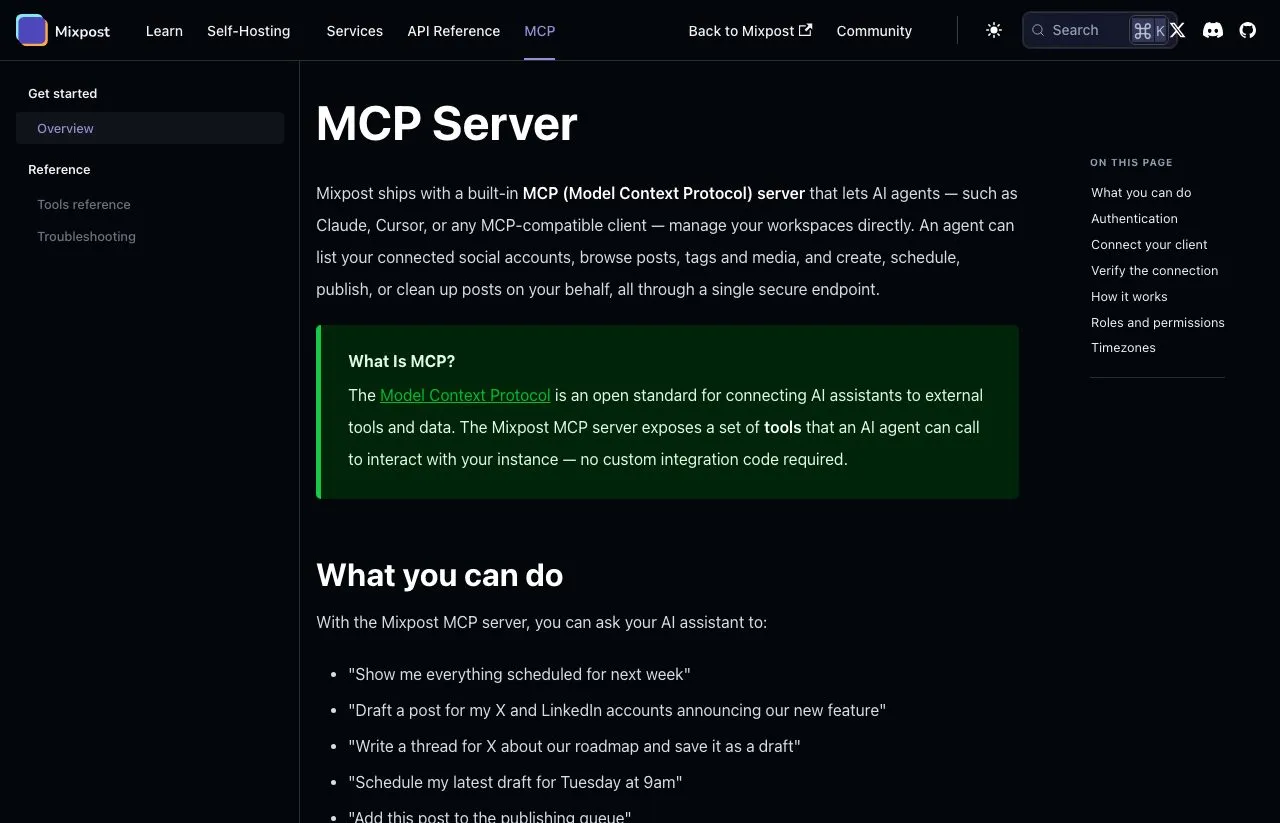
The API and the MCP server are also Pro features. Mixpost ships a genuine built-in server over streamable HTTP with 26 documented tools, not a community wrapper, but you reach it at your own domain after standing up the server and buying the license.
Postiz’s Audience: Open Source With a Hosted Option
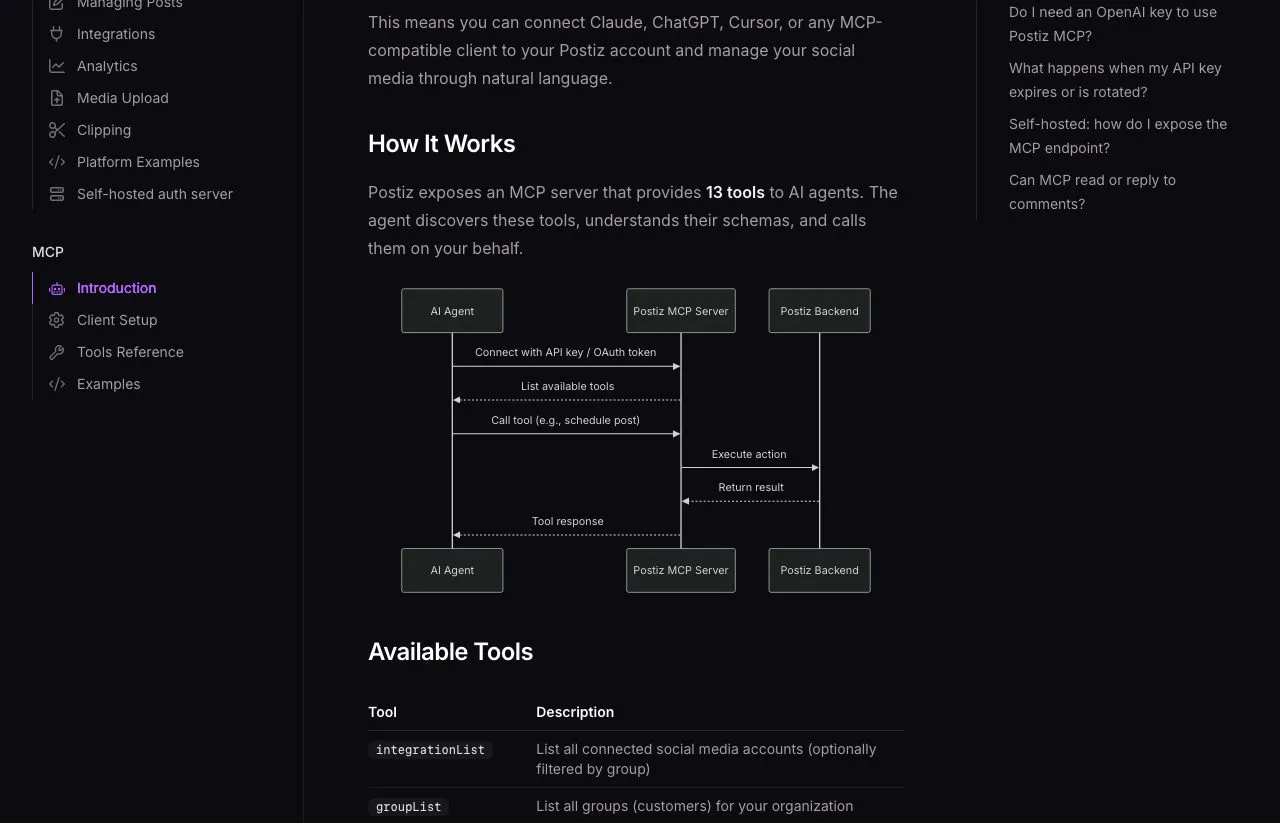
Postiz is for people who want maximum capability at minimum cost and will run infrastructure to get it. Self-hosted under AGPL-3.0, nothing is edition-gated: all platforms, the API, webhooks, an MCP server of 13 documented tools, the AI copilot, analytics. The licence is the free part, and the AI still calls a model provider you pay.
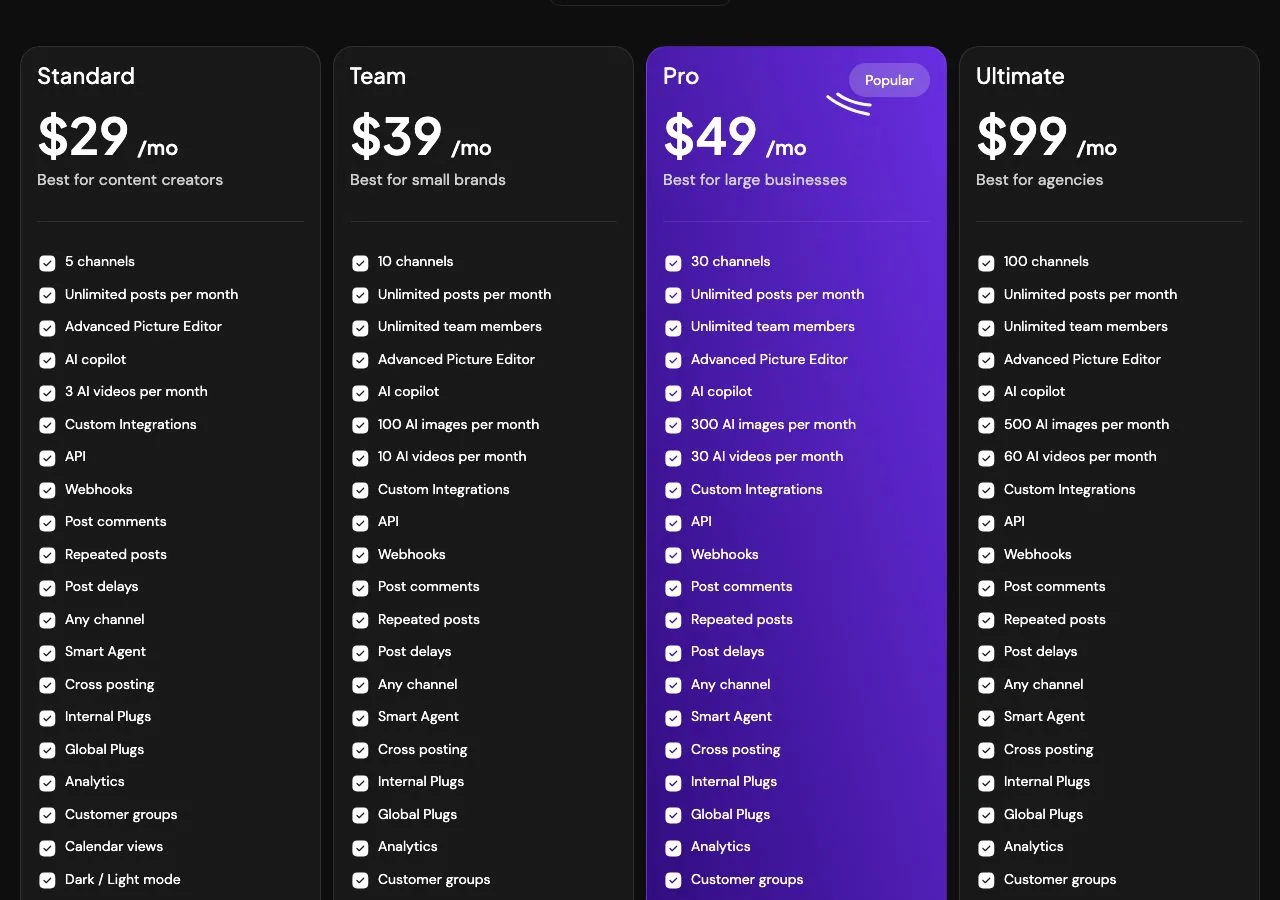
If you would rather not run it, the cloud plans are $29 a month for 5 channels, $39 for 10, $49 for 30 and $99 for 100, with a 7-day trial. That optionality is something Mixpost does not offer at all.
Platform reach is where Postiz separates. Postiz counts its own reach at 32 to 34 depending on which of its doc pages you read, with the public API reference heading a list of 32 and the general docs claiming 34. Neither total is like-for-like: WordPress, Medium and Hashnode are blogs, Listmonk is newsletters, and Skool and Whop are communities. As conventional social networks the count is lower, though Mastodon, Bluesky, Discord, Telegram, Slack, Reddit, Farcaster and Nostr are all reachable, a wider net than Mixpost casts.
The AGPL license is the trade. Its network clause means a modified Postiz offered as a service owes your users the modified source. It does not forbid a commercial product, it just means your customers can ask you for the code you changed. Irrelevant for internal use, decisive if you planned to keep those changes private, and precisely where Mixpost’s MIT Lite edition and Enterprise license are aimed.
On requirements, Postiz asks for more moving parts. Postgres, Redis, and since v2.12.0, Temporal. Official system requirements list 2 vCPU and 2 GB RAM as the supported floor for the all-in-one Docker install, 4 GB or more once you add users, and 4 vCPU with 8 GB as the recommended spec. The out-of-memory warning people quote applies to building from source, not the official image, and has a documented fix.
Mixpost’s server requirements are PHP 8.3, MySQL, Redis, Supervisor, cron, FFmpeg and libvips. Fewer exotic services, but no published CPU or RAM minimum at all.
Mixpost vs Postiz: Side by Side
| Category | Mixpost | Postiz |
|---|---|---|
| License (free edition) | MIT | AGPL-3.0 |
| Paid model | $299 one-time (Pro) | $29 to $99/mo (cloud) |
| Free edition scope | 3 platforms only | Full product, self-hosted |
| Hosted option | None, self-host only | Yes |
| Platforms | 11 to 12 on Pro, 3 on Lite | 32 to 34, by its own docs |
| GitHub stars | About 3,700 | About 35,600 |
| Stack | PHP 8.3, Laravel, MySQL, Redis | Node, Postgres, Redis, Temporal |
| REST API | Pro and Enterprise | All tiers |
| MCP server | Yes, 26 tools (Pro) | Yes, 13 documented tools |
| AI text | Yes, bring your own key (Pro) | Yes, included |
| AI images | Yes, bring your own key (Pro) | Yes, metered |
| AI video | No | Yes, metered |
| White label | Yes (Pro and Enterprise) | No |
| Multi-tenant workspaces | Yes (Pro and Enterprise) | Allowed, but AGPL source duty applies |
| Billing clients for it (SaaS) | Enterprise only | Allowed, if you publish your changes |
| n8n | Vendor node, v0.1.1 (a year old) | Official node, actively updated |
The license row and the free-edition row are the two that actually decide it. Everything else is preference.
Mixpost’s Case: Buy Once, Run Forever
MIT licensing on Lite. No copyleft, no network clause. If you are building something commercial on top of the free edition, this is a materially different legal position than AGPL.
One payment, not a subscription. If you plan to run this for years, a license that never renews beats a bill that never stops.
Built for reselling. Pro covers white labeling and client workspaces, and Enterprise adds the subscription management and billing you need to actually sell hosted access.
A broader MCP surface. The extra tools over Postiz are workspace, tag and media management rather than more ways to post, so an agent that files and organizes has more to call.
A stack many teams already run. Laravel, MySQL, Redis. No Temporal to learn. For a PHP shop this is a codebase your developers can actually modify.
Nothing Is Gated in the Free Postiz Edition
The free version is the whole product. Self-host and you get every platform, the API, MCP and AI with nothing gated. Mixpost’s free tier gives you three destinations. For most people this alone settles it.
Far more reach. Somewhere between 32 and 34 destinations against roughly a dozen, including Discord, Telegram, Slack, Reddit, Farcaster and Nostr, plus blog targets Mixpost does not touch.
A much larger community. Roughly ten times the GitHub stars, an active Discord, and more third-party material. When something breaks at 11pm, someone has probably hit it already.
Better-maintained automation nodes. n8n-nodes-postiz is current and Postiz has a listed Make app. Inovector publishes its own n8n-nodes-mixpost, so this is not vendor-versus-community, but at v0.1.1 and a year without a release, automation there leans on the REST API and webhooks.
The Real Cost Math
The sticker prices mislead in both directions, so here is the three-year view. Self-hosting either one means a server, so assume a $12 a month VPS in both self-host columns, which is a light-usage figure well under the 8 GB Postiz recommends for a busy install.
| Scenario | Year 1 | Year 3 total |
|---|---|---|
| Mixpost Lite (3 platforms) | $144 | $432 |
| Mixpost Pro, self-hosted | $443 | $731 |
| Postiz self-hosted | $144 | $432 |
| Postiz cloud, 10 channels | $468 | $1,404 |
Postiz self-hosted is the cheapest way to get a full-featured tool, full stop. If the cloud column is the one you are weighing, we broke down what each Postiz tier actually meters separately. Mixpost Pro costs $299 more than Postiz self-hosted for a narrower platform list, and what you are buying is the licence and the white-label rights, not extra reach.
The column none of this shows is your time: patching a server, rotating OAuth tokens when a platform expires them, fixing the queue when a worker dies. That invoice never appears on a pricing page, and it is the same for both.
Where this math misleads. If you only need Facebook, X and Mastodon, Mixpost Lite is free forever and Postiz self-hosted is overkill. If you are reselling to clients, Mixpost’s Enterprise license is built for it while AGPL asks you to hand your modified source to those clients. And if you are a Laravel team, the value of a codebase you can read yourself is real even though it never shows up in a table.
The Third Option: Paying Someone Else to Run It
Disclosure: I built Blotato, so read this as an interested party and weigh the two sections above more heavily. I have also put it against each of these tools on its own terms.
Blotato answers the same question by not handing you a server: $29 a month flat, 20 accounts, 9 platforms, no queue worker to babysit at 2am.
All three ship an MCP server. The question is what each lets an agent do.
| What your agent can do | Mixpost | Postiz | Blotato |
|---|---|---|---|
| Documented tools | 26 | 13 | 35 |
| Where the server runs | Your server, Pro license | Your server, or their cloud | Hosted at mcp.blotato.com/mcp |
| Publish and schedule | Yes | Yes | Yes |
| Read back your posts | Yes, list-posts | Yes, postsListTool | Yes |
| Read and reply to comments | No comment tools | No, “not today” per its docs | Instagram and Facebook |
| Read and reply to DMs | No | No | Instagram and Facebook |
| Analytics through MCP | No analytics tool | No analytics tool | 8 platforms, LinkedIn excluded |
| Generate images or video | Images via your own key | Both, metered | Both, credit-metered |
| Try the MCP server for free | No, Pro only | Yes, self-hosted | No, the trial excludes the API |
Blotato is the right third option only if self-hosting was never the actual requirement and nine platforms cover your stack, and if data residency or owning the code is the point, install Mixpost or Postiz and skip us entirely. For the Postiz half of that call, the Postiz comparison covers the API caps and the MCP tool lists in detail.
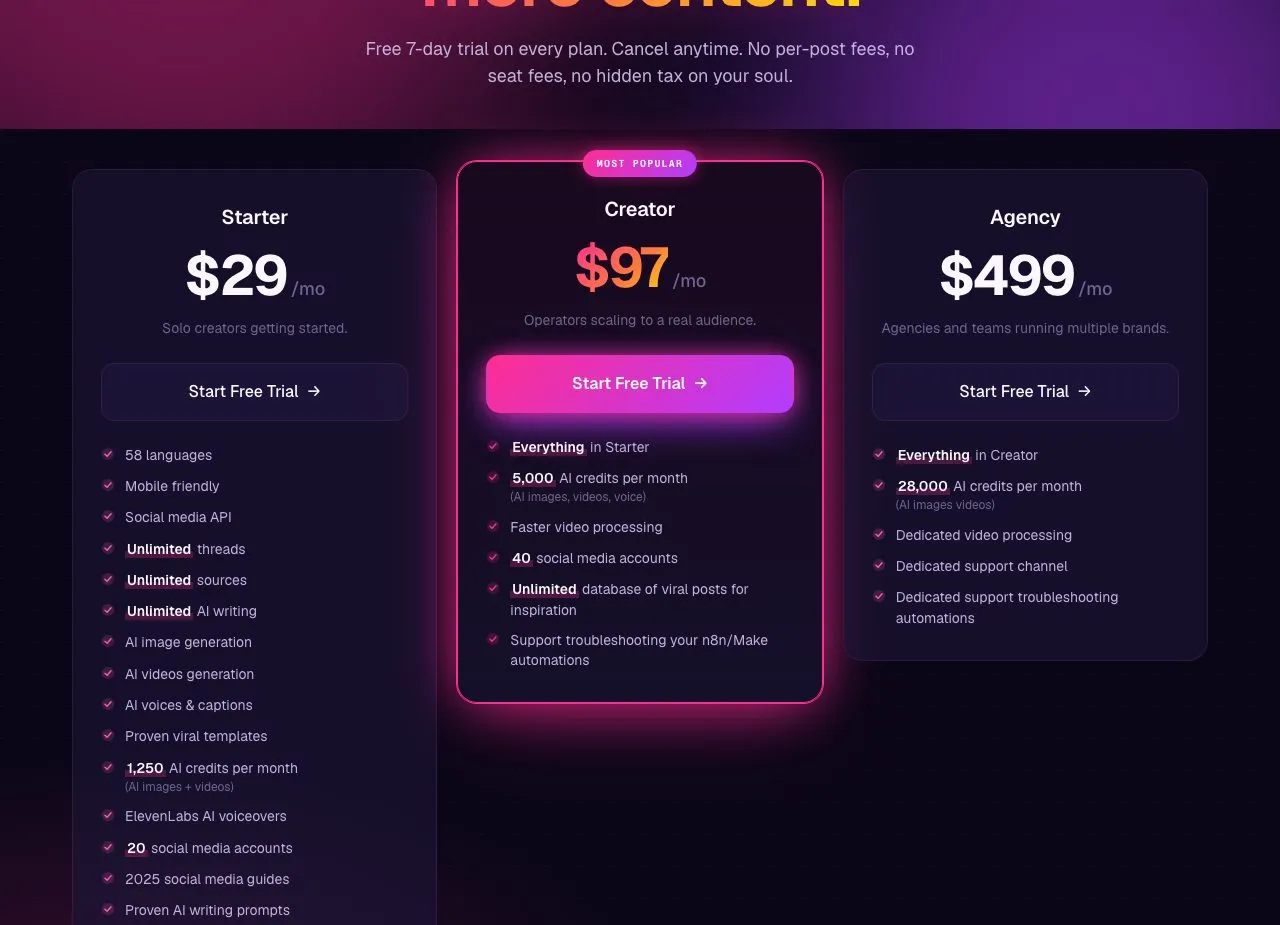
Two limits before that table reads as a clean sweep. Both tools here reach far more destinations than our 9. And we throttle harder than the networks do: Instagram allows 100 posts a day and we cap each account at 50 per 24 hours, LinkedIn at 50, Pinterest at 10 pins, an anti-spam decision you inherit. The trial row means an API reader should budget for a Starter subscription rather than a test drive.
Mixpost Fits a One-Time License and Your Own Server
- You need MIT licensing rather than AGPL copyleft.
- You want to pay once instead of monthly.
- You are white labeling or reselling to clients.
- Your team writes Laravel and wants to modify the code.
- Facebook, X and Mastodon are enough to start free.
Postiz Fits Active Development and an API
- You want the complete product free while self-hosting.
- You need Discord, Telegram, Slack, Reddit, Farcaster or Nostr.
- You want the option to move to a hosted plan later.
- You want a larger community when something breaks.
- You need AI video generation in the same tool.
Two Self-Hosted Roads, Different Bills
For most people asking this question, if you are willing to run Postgres, Redis and Temporal yourself, Postiz self-hosted is the stronger default. That conclusion holds only as long as you are the one maintaining the server, which is the condition doing most of the work in that sentence.
Mixpost earns the $299 in specific cases, and they are real ones. If the AGPL’s source-disclosure duty is one you would rather not carry, if you are white labeling for clients, or if your team lives in Laravel, that license is worth paying for and the one-time price ages well.
So: if you can run Postgres, Redis and Temporal and the AGPL duty does not bite, spend an evening and a VPS on Postiz self-hosted before you spend anything else. If that duty does bite, or you are white labeling for clients, the $299 is the cheaper answer and I would buy it. And if three months of patching tells you the servers were the real purchase, pricing a managed plan is the reasonable next move.
If self-hosting turns out not to be the requirement you thought it was, Postiz against a hosted API like Zernio is the next comparison to read. If neither of these two is the answer, see everything else worth considering once you stop self-hosting and our open source versus managed API breakdown.
Mixpost vs Postiz FAQs
Is Mixpost or Postiz cheaper?
Postiz, in most cases. Self-hosted Postiz is free and complete, while Mixpost’s free Lite edition covers only Facebook Pages, X and Mastodon. Mixpost Pro costs $299 one-time to unlock the rest. Postiz only costs money if you choose cloud hosting, which starts at $29 a month and passes Mixpost’s one-time price in about ten months.
What is the license difference between Mixpost and Postiz?
Mixpost Lite is MIT and Postiz is AGPL-3.0. The practical test is whether anyone outside your company will reach the thing over a network: if yes, and you modified Postiz, those users can ask you for your source. Note the licence covers only Mixpost’s free Lite edition. Pro and Enterprise are commercial licences with their own terms, so “Mixpost is MIT” is true of the edition most buyers do not end up running.
Do Mixpost and Postiz both have MCP servers?
Yes. Mixpost documents 26 tools but gates MCP behind the $299 Pro license and your own server. Postiz documents 13 and includes MCP in the free self-hosted edition. Blotato, Zernio and Ayrshare all ship one too, as we found when we ranked the servers themselves.
Can you self-host Mixpost for free?
Yes, under MIT, but Lite reaches only Facebook Pages, X and Mastodon. Everything else, including the API, MCP and the AI assistant, needs the $299 Pro license.
Which supports more social platforms?
Postiz, by a wide margin. Its own docs put the total at 32 on the public API reference and 34 in the general introduction, a gap Postiz has not reconciled. Mixpost supports eleven or twelve on Pro depending which of its own pages you read, and 3 on free Lite. Count only conventional social networks and the gap narrows sharply.
What does self-hosting either one actually require?
Mixpost needs PHP 8.3, MySQL, Redis, Supervisor, cron, FFmpeg and libvips, and publishes no CPU or RAM minimum. Postiz needs Postgres, Redis and Temporal, with official requirements listing 2 vCPU and 2 GB RAM as the supported floor, 4 GB or more for multiple users, and 8 GB as the recommended spec. Both leave you responsible for updates, OAuth token renewals and uptime.
Is Postiz free?
Self-hosted, yes, and nothing is held back: every platform, the API, MCP and the AI copilot are included under AGPL-3.0. The hosted side has no free tier at all, only a 7-day trial, after which it starts at $29 a month for 5 channels. So “free” here means free software you run, not a free account someone runs for you.
Which is better, Buffer or Postiz?
It turns on channel count: Buffer is free at 3 channels and roughly a wash at 5, while Postiz cloud is cheaper from about 10 channels up and self-hosted Postiz costs nothing in license at any count. We put the two of them on the same rate card if that is the comparison you actually came for.