7 Best Tailwind App Alternatives That Post Past Pinterest (2026)
The best Tailwind app alternatives in 2026, compared on real platform reach, Pinterest support, and per-account cost. Tested by Sabrina Ramonov.

Tailwind publishes to exactly three networks: Pinterest, Instagram and Facebook. That is the whole reason Tailwind app alternatives gets searched, because the day you add TikTok, LinkedIn, X or YouTube, Tailwind cannot follow you there and a second subscription appears. The Pinterest scheduling itself is genuinely excellent, and Tailwind calls itself Pinterest’s longest standing developer partner, going back to 2012. Nobody is leaving over the pin tools. I’m the founder of Blotato, my top pick below, so weigh that entry with the appropriate grain of salt and judge it on the platform math.
A quick note on the name. This post is about Tailwind the Pinterest scheduling app at tailwindapp.com, not Tailwind CSS. If you landed here looking for a utility-first CSS framework, this is the wrong list.
Quick Comparison: 7 Best Tailwind App Alternatives
| Tool | Best For | Starting Price | Key Strength |
|---|---|---|---|
| Blotato | Creators publishing to every major network from one place | $29/mo flat | 9 platforms and 20 accounts at one price, with AI that creates the post |
| Buffer | Pinterest users who want a free plan and simple cross-posting | Free, then $6/channel/mo ($5 annual) | The most forgiving free tier of any tool that supports Pinterest |
| Metricool | Creators who want Pinterest analytics as good as the scheduling | Free, then $25/mo | Deep per-network reporting including Pinterest, free plan included |
| Publer | People adding networks one at a time who hate tier jumps | Free, then $5/mo first account, $4 each after | Pay per connected account, so a fourth network costs a few dollars |
| Later | Visual creators who plan a feed before they schedule it | $18.75/mo billed yearly | Strong visual planning across an 8-profile social set |
| Planoly | Pinterest and Instagram creators who design as they schedule | From $14/mo billed yearly | Multi-board Pinterest scheduling from a single design |
| Pallyy | Budget-minded creators who mostly need a clean calendar | Free, then $25/mo | Full Pinterest composer with board, title, and destination link |
Pallyy sits last for one specific reason worth knowing up front. Its pin composer is complete, but it provides no Pinterest analytics whatsoever. If Pinterest reporting is why you pay Tailwind today, skip to Metricool instead.
Platform reach at a glance
Tailwind’s publishing ceiling is three networks. Everything below clears it, which is the first filter most people apply. Blotato’s own plans and account limits are laid out here if you want to check the math against your own network count.
| Tool | Networks supported | MCP server | Free plan | |
|---|---|---|---|---|
| Tailwind | Yes, its specialty | 3 on its pricing page (Pinterest, Instagram, Facebook) | Yes, Pinterest-only | Yes, 5 posts/mo |
| Blotato | Yes | 9 | Yes, all 9 platforms | No, 7-day trial |
| Buffer | Yes | 11 | Yes, in beta | Yes, 3 channels |
| Metricool | Yes | 8 plus | Yes, on every plan | Yes, 1 brand |
| Publer | Yes | 13 | No official server | Yes, 3 accounts |
| Later | Yes | 8 per social set | No official server | Yes, 12 posts per profile (help center only) |
| Planoly | Yes | 8 per social set | Yes, drafting and scheduling work on the free plan | Yes, 10 posts/mo |
| Pallyy | Yes, publishing only | 10 integrations | Yes, on every plan | Yes, 15 posts/mo |
Two caveats worth knowing before you sign up. Publer’s free plan requires a Pinterest account with 100 or more followers or a claimed website before it will connect. Pallyy publishes pins in full, with board, title, description, destination link and alt text, but its analytics cover Instagram, Facebook and LinkedIn only.
Why People Are Looking for Tailwind App Alternatives
Tailwind built its reputation on Pinterest and still deserves it. SmartSchedule, interval scheduling, Pin looping and the browser extension are genuinely better at pin logistics than most general schedulers, and Communities, formerly Tribes, is still running. On G2 it holds 4.3 out of 5.
The reason people leave is scope. Tailwind is a Pinterest tool with Instagram and Facebook attached, and its own marketing has leaned harder into Pinterest over time. Its pricing page describes picking the Pinterest tools you need, and its homepage names Pinterest dozens of times while Instagram and Facebook appear only in the footer links. There is no TikTok, no LinkedIn, no X, no Threads, no Bluesky and no YouTube. For a creator whose Pinterest traffic funds a business that now lives on four other networks, that is the whole problem.
Cost is the second trigger, and it compounds with the first. Tailwind prices per account, so a creator running two or three brands buys two or three subscriptions rather than moving up a tier. That shows up in reviews, where a recurring complaint on Capterra is that the return on investment is poor for what the app actually does.
The third reason shows up in the review split. Tailwind rates 4.3 on G2 but sits at 3.5 on Trustpilot, where the complaints cluster around billing rather than features: difficulty cancelling online, charges landing after a cancellation, and no renewal reminders. That is a pattern worth knowing before you commit to another annual term.
Automation is the one place Tailwind has closed a gap. In January 2026 it launched a public API and a hosted MCP server, so Claude or Cursor can list accounts, manage boards and schedule pins directly. The catch is the same as everywhere else: the API is Pinterest-only. It can schedule a pin and nothing else, so an agent that also handles your TikTok or LinkedIn still needs a second tool behind it. If you are building against Pinterest directly, I covered what Pinterest’s own API costs and allows separately.
Best Tailwind App Alternatives for 2026
I limited this to seven tools that all clear the bar a Tailwind user actually cares about: every one of them publishes to Pinterest. A “Tailwind alternative” that cannot post a pin is not an alternative.
1. Blotato: Best for creators publishing to every major network from one place

Blotato’s homepage: one flat plan covering 9 platforms with content generation built in.
I built Blotato for the exact problem Tailwind creates. Instead of a Pinterest tool plus a second subscription for everything else, Starter is $29 a month for 20 social accounts across 9 platforms, and the caption, image or faceless video is generated in the same place it gets published. It also runs a hosted MCP server at mcp.blotato.com/mcp covering all 9 platforms, where Tailwind’s own MCP server can only touch Pinterest. I use it daily for my own content.
Honest limitation: Blotato does not match Tailwind’s Pinterest depth. There is no Pin looping, no Communities, no Tailwind Create equivalent for bulk pin design, and no SmartSchedule tuned specifically to pin timing. If Pinterest is 90% of your traffic and you love those features, keeping Tailwind for pins is a defensible choice.
Pricing: Both tools meter AI credits, so compare that line rather than the monthly fee. Tailwind allows 150 a month on Pro and 300 on Advanced; here it is 1,250 on Starter at $29, 5,000 on Creator at $97, 28,000 on Agency at $499, spent only when an image or video is generated. Unused credits roll into the next month, and if you cancel they last until the paid month ends. The 7-day trial needs a card and excludes API access, so an API or MCP build should begin on a paid plan.
Ideal for: Creators whose audience outgrew Pinterest and who do not want a second tool for the other six networks.
Bottom line: Keeping Tailwind is defensible, and I would say so even here: if pins still drive most of your traffic and you lean on Pin looping or Communities, nothing on this list replaces that. The switch only pays off once the other six networks stop being a side project, because that is the moment Tailwind’s three-network ceiling turns into a second subscription. Start a trial if the second-subscription problem is what brought you.
2. Buffer: Best for Pinterest users who want a free plan and simple cross-posting
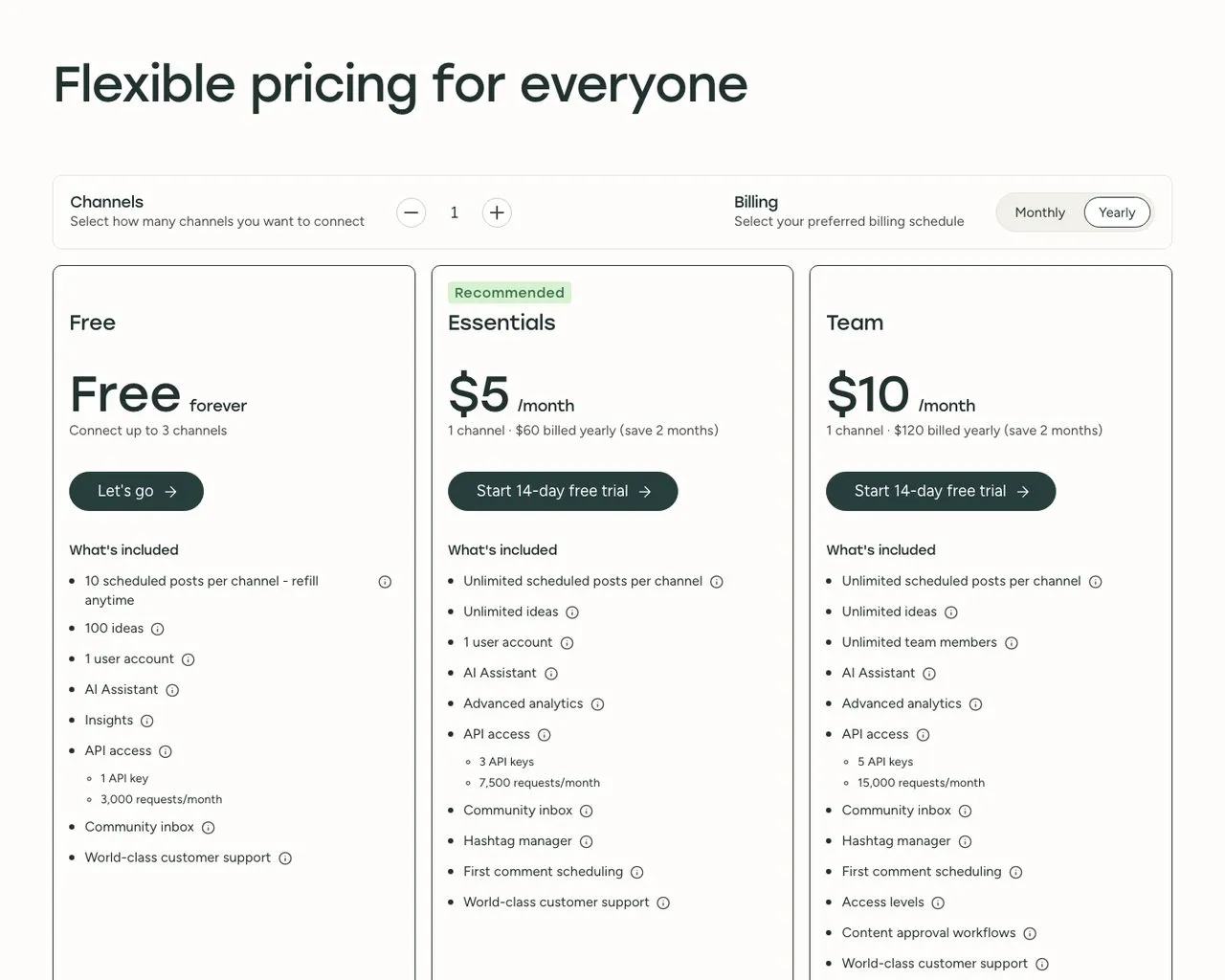
Buffer prices per connected channel and includes Pinterest on every plan, including Free.
Buffer is the softest landing from Tailwind because you can test it without paying. Its free plan covers 3 channels with 10 scheduled posts each, Pinterest included, and paid channels are $5 a month each. It supports 11 networks, so the platforms Tailwind is missing are all there. The trade-off is that Buffer focuses on scheduling rather than creation. There is no pin design tool, and the per-channel model gets expensive past about 8 connections.
Pros:
- Free plan includes Pinterest with no card required
- Supports 11 networks including every one Tailwind lacks
- Ships an official MCP server for agent-driven publishing, currently in beta
Cons:
- No Pinterest-specific features like looping or interval scheduling
- Per-channel pricing adds up past roughly 8 channels
- Minimal content creation tooling
Pricing: Free (3 channels). Essentials $6/mo per channel ($5 annual), Team $12/mo per channel ($10 annual) with unlimited users. Channels past 10 cost less each, dropping to $4 from channel 11 and $3 from channel 26.
Ideal for: Creators who want to try life beyond Pinterest without committing a budget.
Bottom line: The lowest-risk way to find out whether you actually need Tailwind’s pin depth. The per-channel math against a flat plan is laid out in Blotato vs Buffer.
3. Metricool: Best for creators who want Pinterest analytics as good as the scheduling
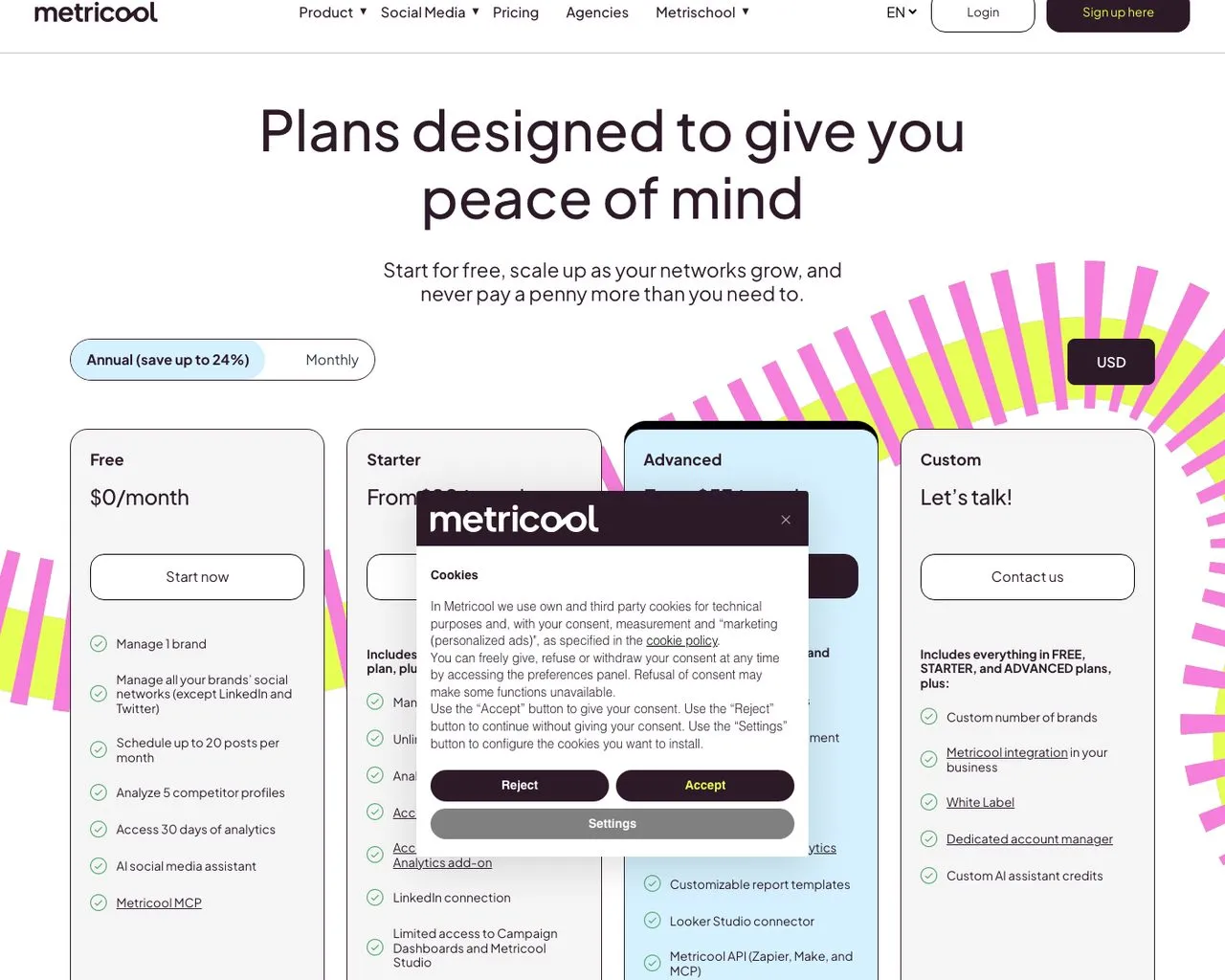
Metricool prices by brand and reports on Pinterest alongside every other connected network.
If you pay Tailwind partly for its Pinterest reporting, Metricool is the closest replacement, and on reporting depth it goes further. It covers Pinterest on every plan including Free, and its analytics go deeper than anything else at this price, with competitor tracking and best-time-to-post modeling across networks. It also ships an MCP server that works on every plan, including the free one. Scheduling is capable but plainer than a dedicated visual planner.
Pros:
- Pinterest analytics on every tier, including the free plan
- Competitor tracking and cross-network reporting in one view
- MCP server available even on Free
Cons:
- No pin design or bulk-creation tooling
- Dense interface with a longer learning curve
- Approval workflows only on the Advanced plan
Pricing: Free (1 brand, 20 posts/mo). In USD, Starter starts at $25/mo billed monthly or $20/mo billed yearly, and Advanced starts at $67/mo monthly or $53/mo yearly. Both scale with brand count (Starter covers up to 10 brands, Advanced up to 50), so price the tier against the number of brands you actually run. Custom by quote.
Ideal for: Data-minded creators who want to know which pins and posts actually moved traffic.
Bottom line: The analytics upgrade, with Pinterest treated as a first-class network rather than an afterthought. See how its reporting stacks up against ours if data is the deciding factor.
4. Publer: Best for people adding networks one at a time who hate tier jumps
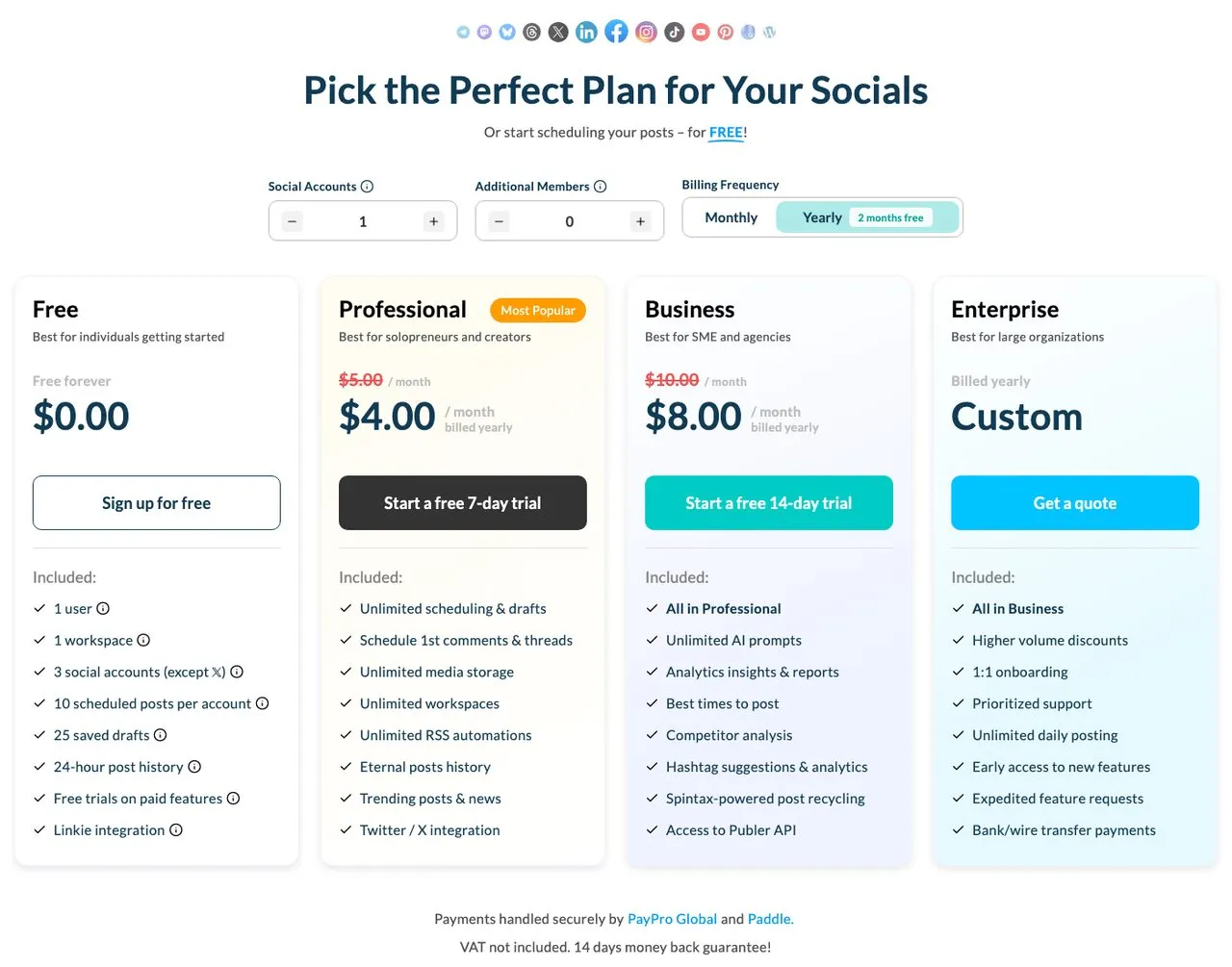
Publer charges per connected social account, so adding one network costs a few dollars.
Publer fits the creator who is leaving Tailwind gradually. Because it charges per social account, adding TikTok and then LinkedIn costs a few dollars each rather than pushing you into a new tier. It supports 13 networks, the widest list here, and has strong bulk scheduling and post recycling that Pinterest users tend to appreciate. One catch to know: on the free plan, connecting Pinterest requires 100 or more followers or a claimed website.
Pros:
- Widest network support on this list at 13
- Per-account pricing with no tier jumps, and the rate falls as you add accounts
- Strong bulk scheduling and evergreen recycling
Cons:
- Free-plan Pinterest connection has a follower or website requirement
- Costs more than flat plans past roughly 8 accounts
- API access sits on the Business tier
Pricing: Free (3 accounts). Professional is $5/mo for one account and $9 for two, and from the third account the calculator prices every billable account at $4, so the whole total resets rather than adding $4 on top of the base. Business runs $10, then $17, then $7 each on the same pattern. Team members cost $2 each on Professional and $3 on Business, and every tenth account is free. Publer’s help centre publishes a simpler formula that yields a higher total from three accounts up. Plan around the calculator, since that is the surface that takes your payment, and I put screenshots of both side by side.
Ideal for: Creators expanding one network at a time who want the bill to grow the same way.
Bottom line: The most granular pricing here, and the widest reach if you are collecting networks. I compared the two approaches directly in Blotato vs Publer.
5. Later: Best for visual creators who plan a feed before they schedule it
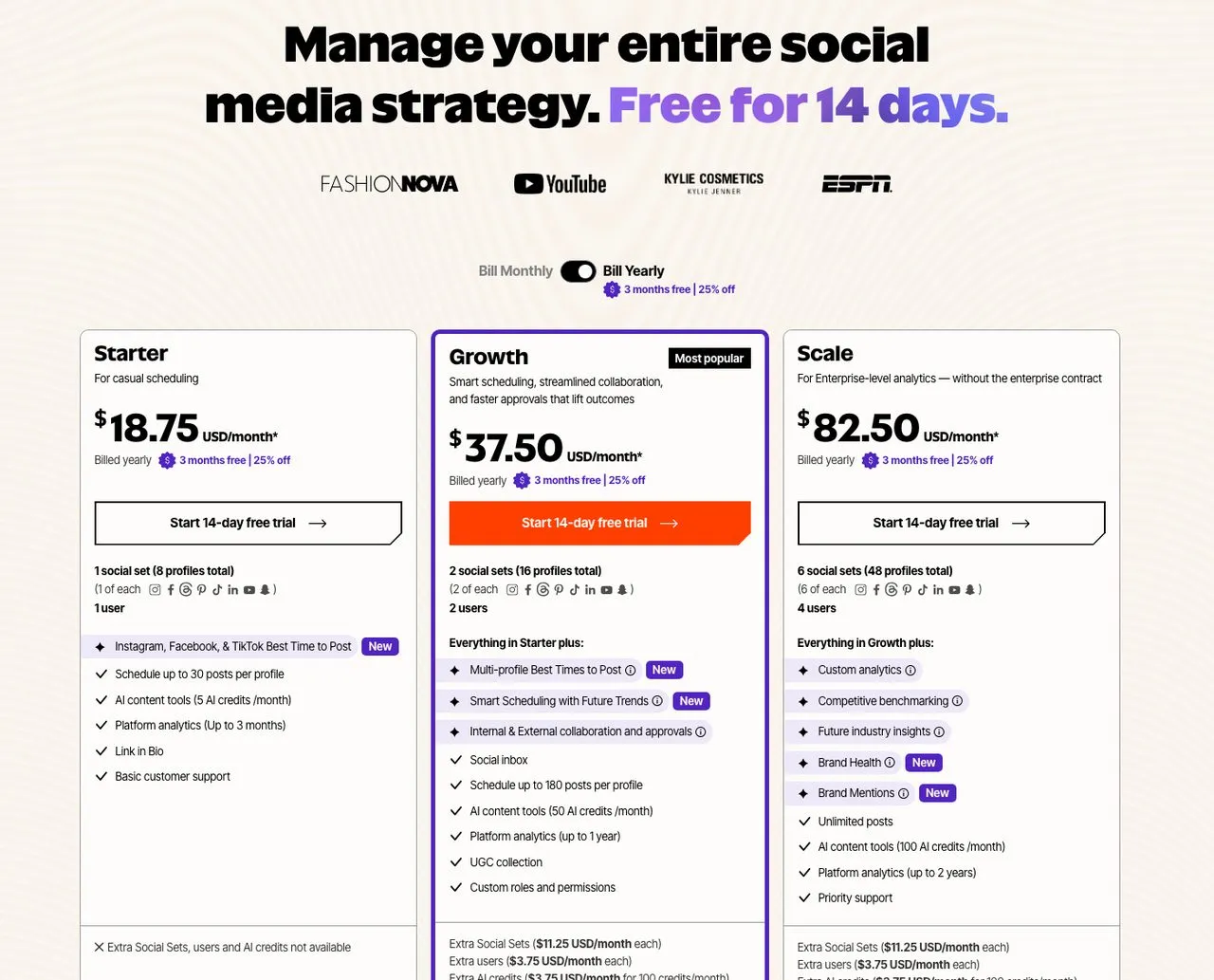
Later bundles one of each supported profile into a “social set,” Pinterest included.
Later is the closest thing to Tailwind’s visual planning instinct applied to more networks. It sells access in social sets, where one set covers 8 profiles, one of each network it supports, so Pinterest arrives alongside Instagram, TikTok, LinkedIn, YouTube, Threads and Snapchat. The visual planner and media library suit creators who think in grids and boards. It is the priciest entry point here for a single brand, and extra social sets are billed on top.
Pros:
- Visual planning and media library built for image-first creators
- One social set spans 8 networks including Pinterest
- Auto-publish supported for Pinterest
Cons:
- Starter is limited to 1 user and 30 posts per profile
- Additional social sets cost extra on top of the plan
- AI credits are metered and thin on the entry tier
Pricing: Starter $18.75/mo billed yearly (1 social set, 1 user), Growth $37.50/mo billed yearly (2 sets, 2 users), Scale $82.50/mo billed yearly. Extra social sets $11.25/mo each. 14-day free trial. Read my longer take in Best Later Alternatives if it makes your shortlist.
Ideal for: Creators who plan visually and want Pinterest inside the same calendar as Instagram and TikTok.
Bottom line: The natural move if Tailwind’s visual planning is what you will miss most. Blotato vs Later covers where its Pinterest tooling genuinely wins.
6. Planoly: Best for Pinterest and Instagram creators who design as they schedule
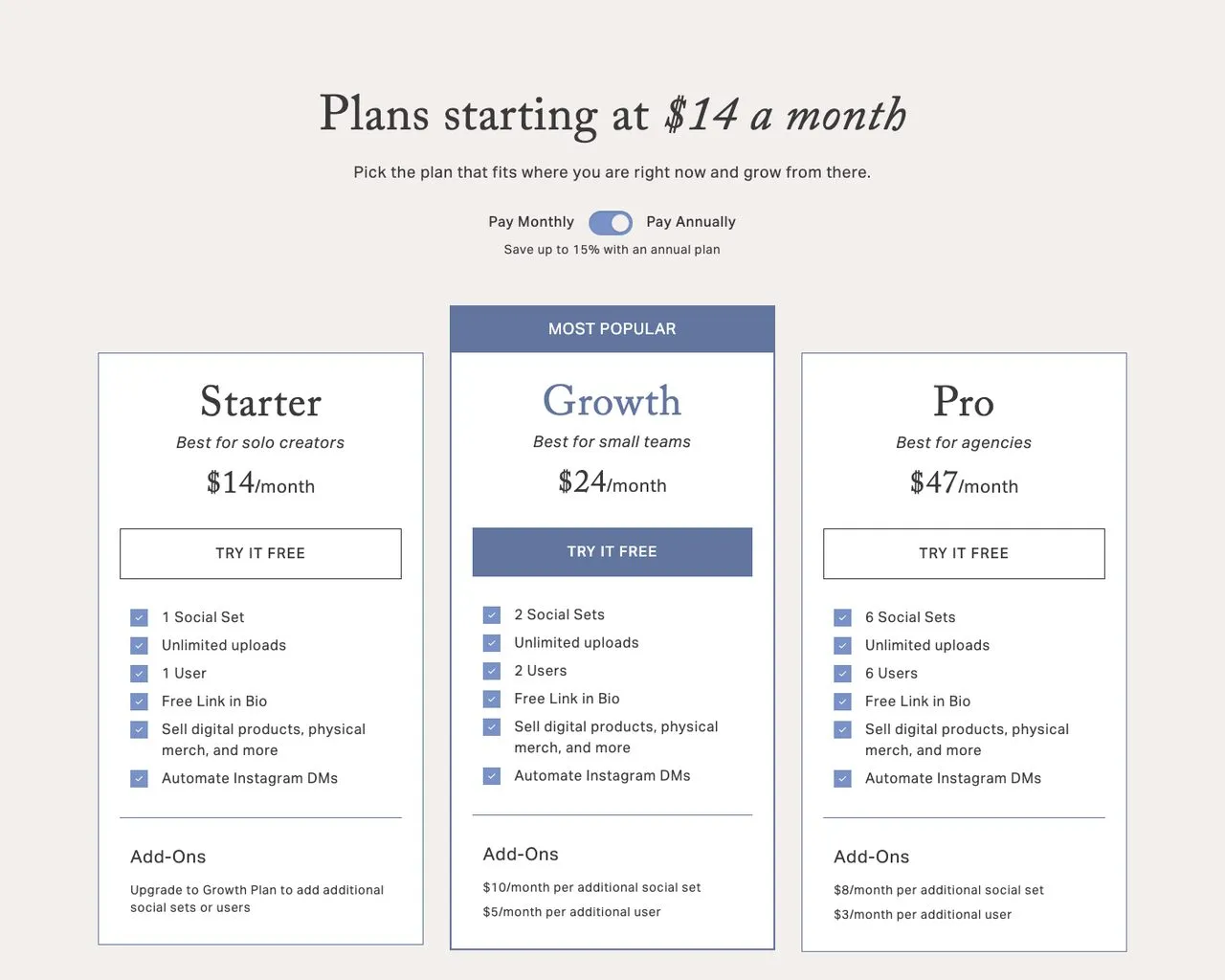
Planoly sells social sets covering 8 channels, with multi-board Pinterest scheduling.
Planoly overlaps Tailwind’s core audience more than anything else here, because it grew up as a visual planner for Pinterest and Instagram creators. It schedules one design to multiple Pinterest boards, and its social set covers 8 channels, so TikTok, YouTube, LinkedIn and Threads come along, with X handled as reminders you post yourself. It stays Instagram-first in feel, and the free plan caps you at 10 posts a month. If you land on Planoly and outgrow it, I mapped out where Instagram creators go after Planoly in a separate post.
Pros:
- Multi-board Pinterest scheduling from a single design
- Social set spans 8 channels including the ones Tailwind lacks
- Design and scheduling live in the same screen
Cons:
- Free plan is capped at 10 posts a month
- A second Instagram or Pinterest account requires a second social set
- Analytics are lighter than Metricool’s
Pricing: Starter $16/mo, or $14/mo billed annually (1 social set, 1 user). Growth $28/mo, or $24 annually (2 sets, 2 users). Pro $55/mo, or $47 annually (6 sets, 6 users). Extra sets $8 to $10/mo and extra users $3 to $5/mo depending on tier. Planoly’s MCP server works on every plan, and drafting and scheduling through it need no paid plan, though what Claude can reach through Planoly’s MCP stops short of comments and DMs.
Ideal for: Pinterest-and-Instagram creators who want to keep designing and scheduling in one place.
Bottom line: The most familiar-feeling switch for a Tailwind user, with four more auto-posting networks attached.
7. Pallyy: Best for budget-minded creators who mostly need a clean calendar
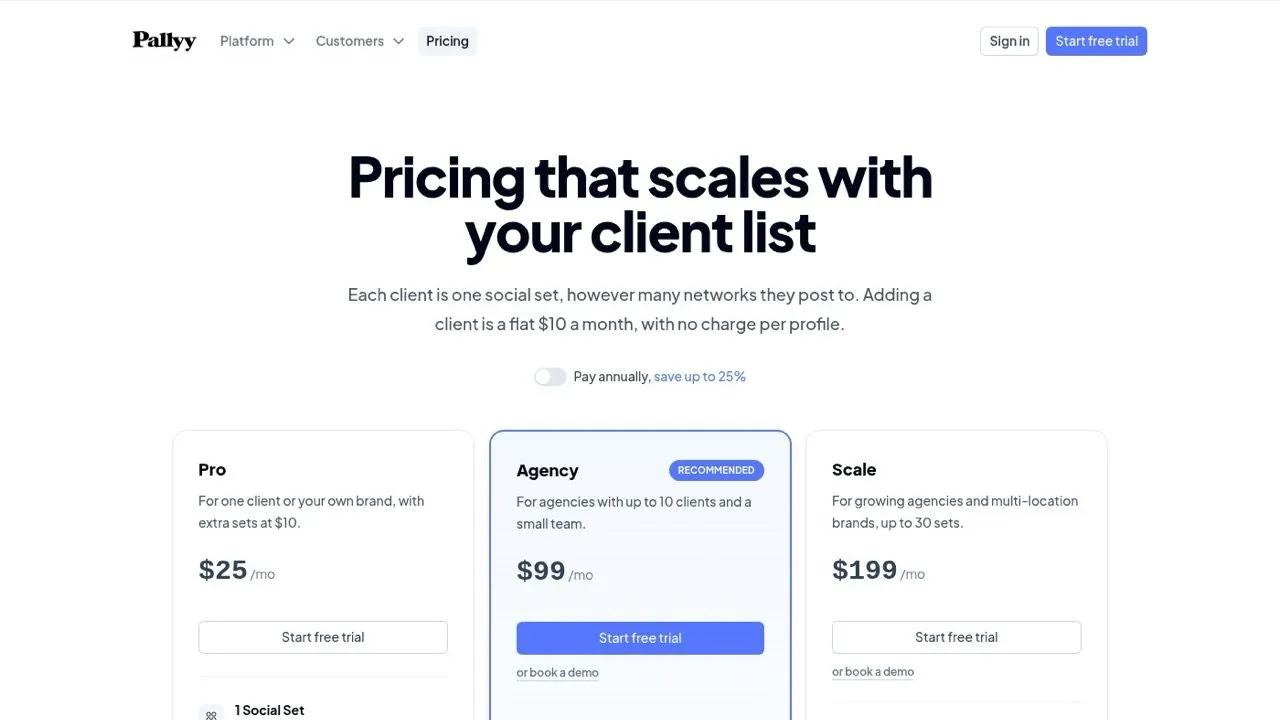
Pallyy keeps pricing simple: a free plan, then unlimited posts from the $25 Pro plan.
Pallyy keeps pricing about as simple as it gets. Its Pinterest composer is complete, covering board selection, pin title, description, destination link and alt text. The free plan covers 15 posts a month, and Pro is $25 a month, or $20 billed yearly, with unlimited posts across the 10 networks it integrates with. Two honest limits keep it at the bottom. Pallyy has no Pinterest analytics at all, and it cannot set different posting times per platform, so a cross-post fires everywhere at once even though pins and Reels peak at different hours.
Pros:
- Complete Pinterest pin composer including destination links and alt text
- Unlimited posts on the $25 Pro plan
- Free plan with 15 posts a month
Cons:
- No Pinterest analytics whatsoever
- Cannot stagger posting times per platform
- The free plan publishes images only, so video and carousels need Pro
Pricing: Free (1 social set, 15 posts/mo), Pro $25/mo (unlimited posts), Agency $99/mo (10 social sets), Scale $199/mo (30 social sets). Yearly billing drops those to $20, $79 and $165 a month.
Ideal for: Creators who need reach and a calendar more than they need reporting.
Bottom line: A simple, low-cost calendar, as long as you are not measuring Pinterest performance.
How I Chose These Tailwind App Alternatives
I evaluated each tool against what a departing Tailwind user is actually solving for:
- Pinterest support first. Every tool here publishes to Pinterest. A scheduler that skips it is not a Tailwind alternative regardless of how good it is.
- How many networks you gain, since the platform ceiling is the reason cited most often in reviews and roundups.
- What one more brand or account costs, because Tailwind’s per-account model is the second reason.
- Whether Pinterest reporting survives the move, which is where several cheaper tools quietly fail.
- Whether AI creation is included or arrives as another subscription.
Pricing and platform support were verified on each tool’s own pricing and help pages on the day this was published, and the strengths and gaps draw on G2, Capterra and Trustpilot review patterns alongside my own testing. Where a limit sits on a specific tier or plan, I named it inside that tool’s entry.
How to Choose the Right Tailwind App Alternative
If you need every major network in one flat bill, Blotato covers 9 platforms and 20 accounts at $29, which is usually cheaper than Tailwind plus a second tool.
If you want to test the water for free, Buffer and Metricool both include Pinterest on their free plans, with no card required.
If Pinterest analytics is the reason you pay Tailwind, go to Metricool and skip Pallyy entirely.
If you are adding networks gradually, Publer’s per-account pricing means a new platform costs a few dollars rather than a tier upgrade.
If visual planning is what you will miss, Later and Planoly are the two built for creators who plan a grid or a board before they schedule.
If you want an agent to do the posting, Tailwind’s own MCP server handles pins but stops at Pinterest. Blotato, Buffer and Metricool expose MCP endpoints that reach every network they support, and the wider field is covered in my roundup of social media automation tools.
Sabrina’s Final Thoughts
Tailwind is not a bad tool, and this is not a post about escaping one. It is a specialist that got very good at one network and then stayed there while creators kept moving. So the question is not whether Tailwind is good at Pinterest, because it is. The question is what the rest of your posting costs you. If you are already paying for a Pinterest tool and a second tool to reach everywhere else, consolidating is usually cheaper and leaves you one calendar to check instead of two. Blotato’s trial will tell you inside a week whether one tool can carry all of it.
Tailwind App Alternatives FAQs
What is the best Tailwind app alternative?
It depends on why you are leaving. For creators who outgrew Pinterest, Blotato covers 9 platforms and 20 accounts for $29 a month with AI writing and video included. If you want to test something free first, Buffer and Metricool both support Pinterest on their free plans. If Pinterest analytics matters most, Metricool is the strongest pick.
Does Tailwind still work with Instagram and Facebook?
Yes. Tailwind covers Pinterest, Instagram and Facebook, and its plans describe posts across those three networks. What it does not offer is TikTok, LinkedIn, X, Threads, Bluesky or YouTube, and its recent marketing leans heavily toward Pinterest. That three-network ceiling is the most common reason people start looking for an alternative.
Is there a free Tailwind alternative that supports Pinterest?
Yes, several. Buffer’s free plan covers 3 channels including Pinterest, Metricool’s free plan covers 1 brand with Pinterest analytics included, and Pallyy’s free plan allows 15 posts a month. Publer also has a free plan, though connecting Pinterest to it requires 100 or more followers or a claimed website.
Does Tailwind have an API?
Yes. Tailwind launched a public REST API and a hosted MCP server in January 2026, so an AI assistant like Claude can list accounts, manage boards and schedule pins. It is Pinterest-only, matching the rest of the product. If you want one agent to publish across every network, Blotato, Buffer and Metricool expose MCP endpoints that cover far more than pins.
Is Tailwind worth it for Pinterest only?
If Pinterest is the large majority of your traffic, Tailwind’s depth is real and hard to match. The calculation changes the moment you need a second tool for other networks, because you are then paying twice for what one broader tool would cover. Count the networks you actually publish to this month, and if the answer is more than three, the second subscription is already costing you more than a switch would.