How to Post to Bluesky with Claude (No AT Protocol Setup)
Bluesky runs on an open protocol, so why route Claude through anything? The honest answer, plus the setup if you decide it is worth it.

Bluesky is the awkward one to write a guide about. Every other platform in this series makes you fight for write access, and then there is Bluesky: open protocol, free API, no app review, no approval queue. So the honest framing for anyone who wants to post to Bluesky with Claude is not “here is the only way,” it is “here are two ways, and one of them is a script you could write yourself this afternoon.”
The version most people want is the short one. Connect the Blotato MCP server to Claude once, type “post this to my Bluesky,” and Claude calls Blotato, which publishes to your account. I founded Blotato and I run all nine of my platforms through it, 3M+ followers and 500M+ views, so read the recommendation with that attached. What makes it worth $29 is not Bluesky access, which is free. It’s that the same prompt already reaches your other eight accounts.
Either way you need to close the same gap: Claude writes text, and text is not a published post until something with credentials sends it. On Bluesky those credentials are unusually easy to get, which is exactly why the build-it-yourself route is a real option here rather than a token disclaimer.
Route 1, build it yourself: wire the AT Protocol into your own server and hold the credentials. Free, fully under your control, and slower to get running.
Route 2, connect a hosted MCP server: point Claude at a server that already speaks the AT Protocol for you. Setup runs in minutes, and the same connection reaches your other networks too.
| Build it yourself (AT Protocol) | Hosted MCP server | |
|---|---|---|
| Setup time | Hours | Minutes |
| Developer app required | No, but you handle app passwords | No |
| Credentials | You store and rotate them | Handled by the provider |
| Scheduling | You build the queue | Included |
| Other networks | A separate integration per platform | Usually one connection for all |
| Cost | Free, plus your engineering time | Subscription, from $29/mo |
Everything below follows Route 2, using Blotato’s MCP server.
Most guides for Bluesky either walk you through the AT Protocol directly (which means handling credentials and API tokens yourself) or browser automation (which breaks the moment Bluesky changes a button). The Blotato MCP path is neither. One connection lets Claude publish to Bluesky plus eight other platforms. Once posting works, you can run the whole content engine this way, drafting, grading, and scheduling all from Claude.
What do you need to connect Claude to Bluesky?
Get these three things in place before Claude can publish a single Bluesky post:
- A paid Blotato plan. Blotato’s API is what the MCP server runs on, and the API ships with every paid plan: Starter $29/mo, Creator $97/mo, Agency $499/mo. The free trial leaves API and MCP access out.
- A Bluesky account linked in Blotato. Add it in Settings first, before you ever open Claude.
- A Bluesky personal account, since that is the account type Blotato supports here.
- Claude Desktop or Claude Code. The same MCP server drives both, so pick whichever you already use.
How do you post to Bluesky with Claude?
The setup runs from connecting your account to firing the prompt that publishes your post. Four steps, in order.
For the reference version of this setup, including every Bluesky action Claude can call, see the Bluesky MCP server page.
Step 1: Connect your Bluesky account
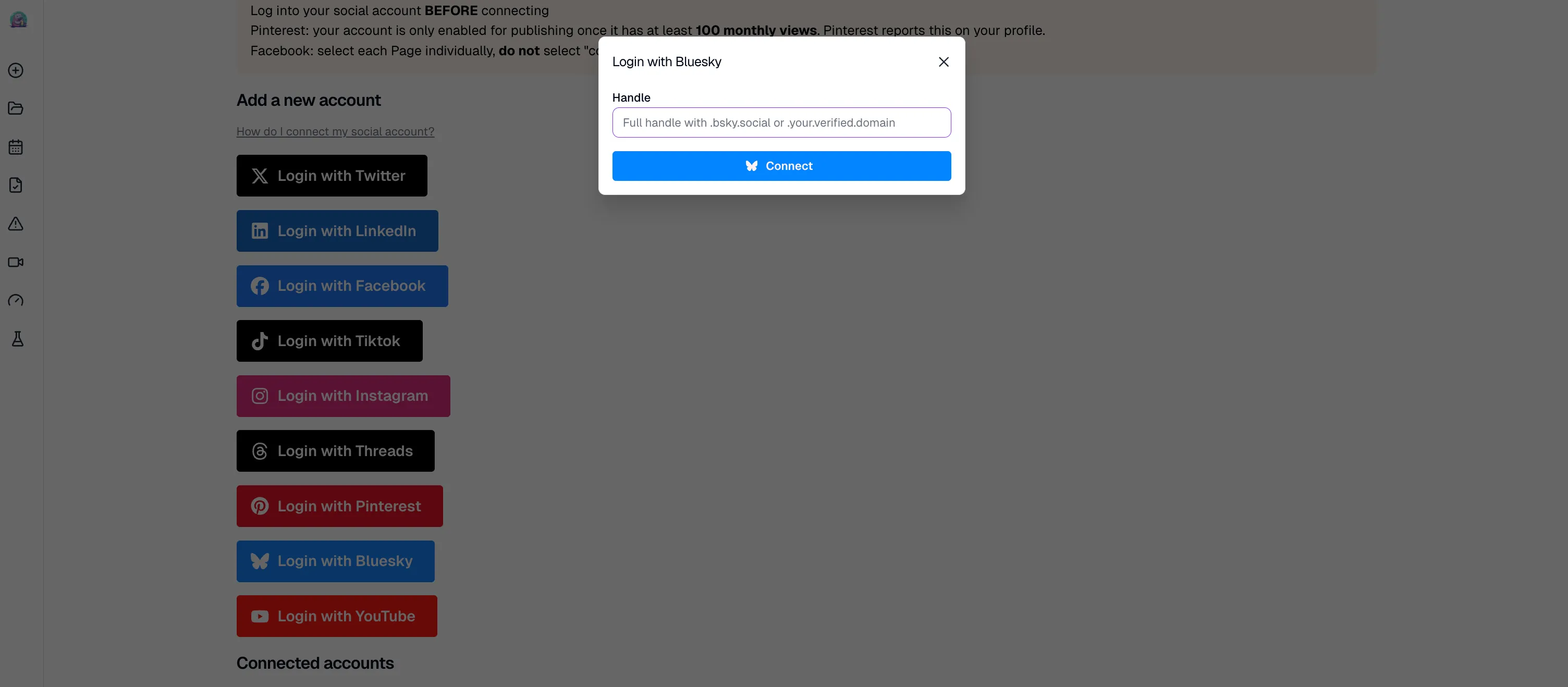
Log into Blotato, open Settings, and click “Login with Bluesky” under your social platforms. Then manually type your Bluesky handle without the leading @, so use yourname.bsky.social, not @yourname.bsky.social. Type it out instead of copy-pasting, since pasting can slip in invisible characters that break the connection. Blotato handles the authentication, so Claude can publish later without you passing credentials around.
Step 2: Add the MCP server to Claude
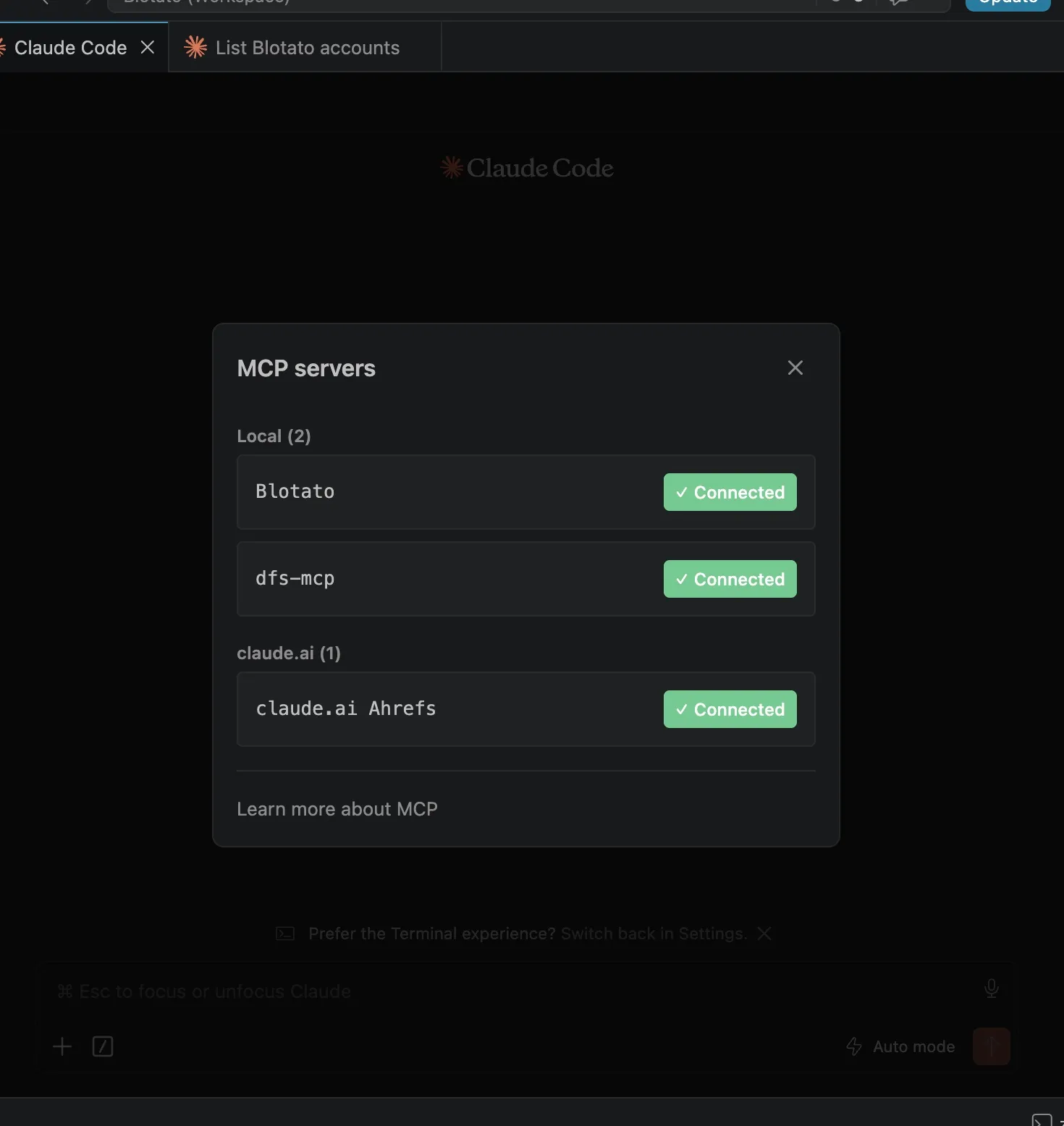
Connect the Blotato MCP server to Claude. On Claude Desktop, open Customize, head to Connectors, and register a custom connector pointing at https://mcp.blotato.com/mcp. On Claude Code, run the command below, then /mcp, choose Blotato > Authenticate, approve access, and restart Claude Code so the server loads.
claude mcp add --transport http Blotato https://mcp.blotato.com/mcpIf you would rather not type the endpoint, this link carries it into the dialog for you. The connector stays attached until you remove it under Customize, and revoking it there cuts Claude’s publishing access immediately.
There is no key to paste, the connection rides on your logged-in browser session. Claude Code has one extra failure mode worth reading first: the server loads at startup, so a session you never restarted shows an empty /mcp panel. The Claude Code setup page covers that and the rest of the troubleshooting. The full walkthrough lives in Blotato’s MCP setup guide. When the /mcp panel lists Blotato as connected, Claude is cleared to post for you.
Step 3: Confirm the account is visible
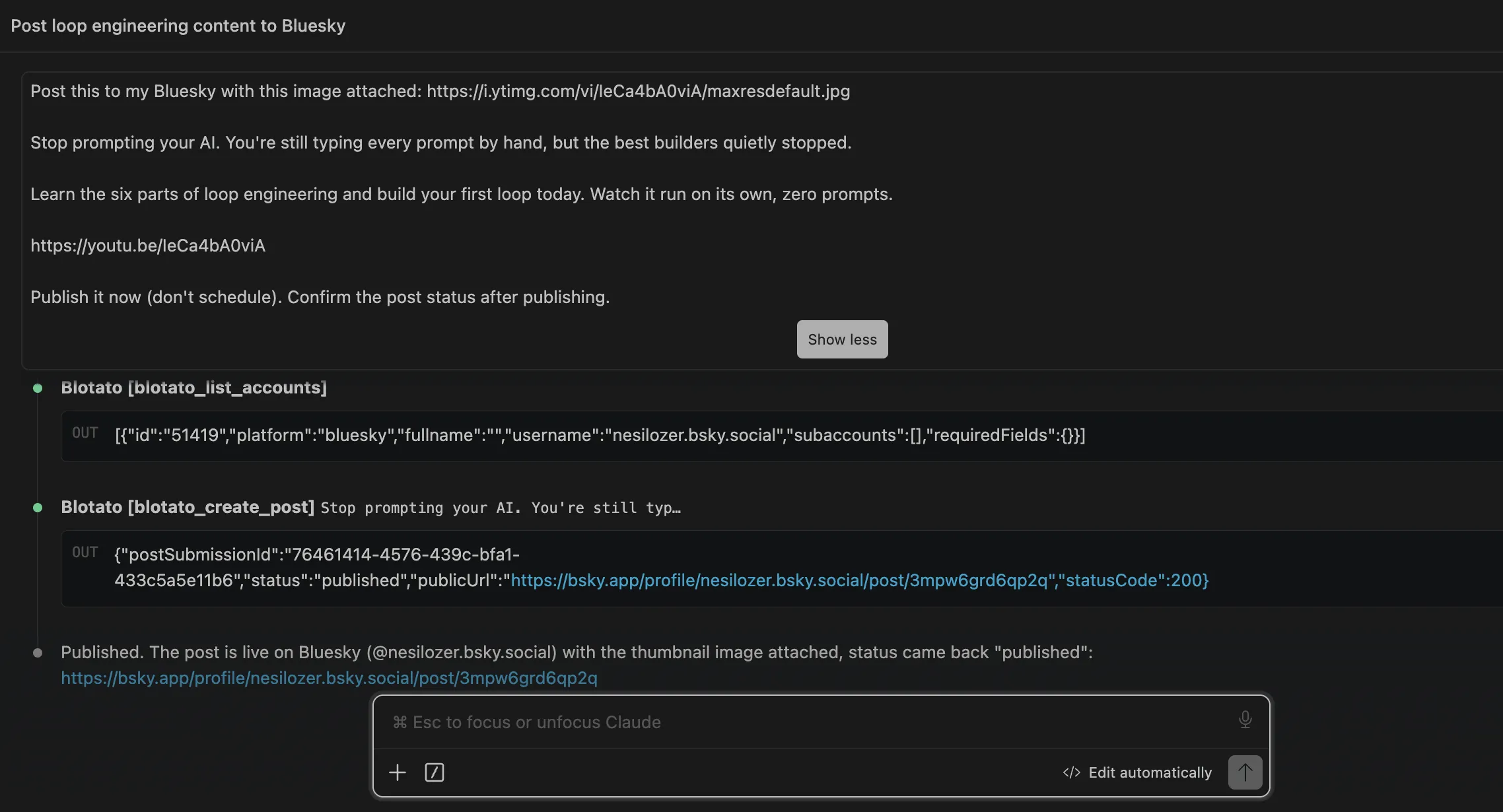
Ask Claude to “list my Blotato accounts.” Claude runs the blotato_list_accounts tool and returns every platform you have connected, including Bluesky, with each account ID. Seeing your Bluesky account in that list confirms Claude can publish to it. If Bluesky is missing, go back to Step 1 and check that the connection saved.
Step 4: Write the prompt that publishes
Tell Claude what to publish in plain language. A prompt like “Post this to my Bluesky: Just launched a new feature with Claude Code” is enough. Claude calls blotato_create_post with your account ID, the bluesky platform, and your post text. Bluesky caps posts at 300 characters, so ask Claude to keep it under the limit if your text runs long. You can attach up to 4 images by including public image URLs in your prompt, and if your idea needs more room than one post, ask Claude for a thread: Blotato chains the replies for you through the same call. Once the status comes back as published, your post is live on your Bluesky timeline.
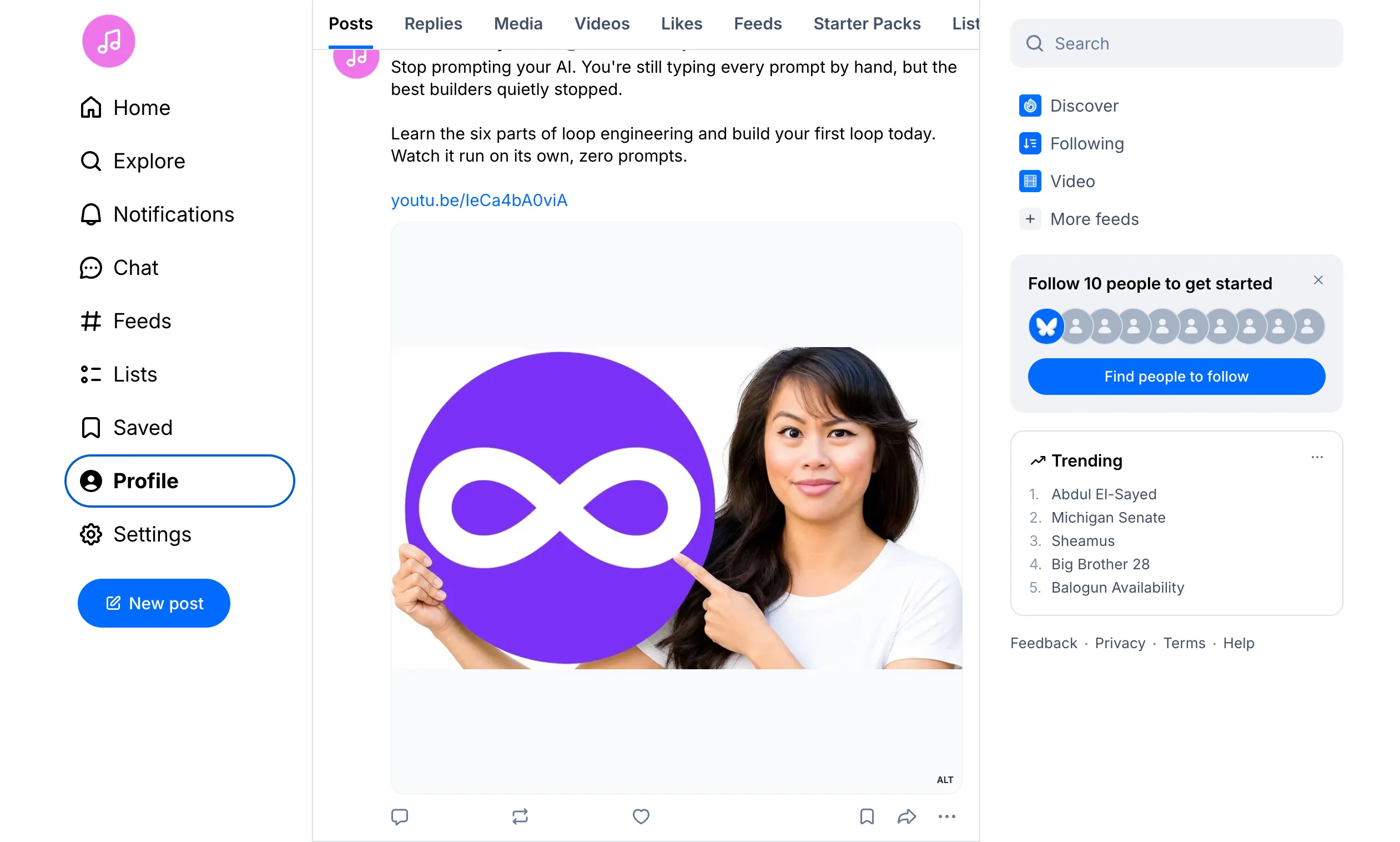
The published post looks like this on the Bluesky timeline, image attached and link in place:
Step 5: Can Claude schedule the post for later?
Say “schedule this for tomorrow at 9am” and Claude hands a scheduledTime to Blotato. Say “drop it in my next free slot” instead and Blotato picks the next open time on your calendar. The reschedule is the part worth remembering, because it stays conversational: “move the Friday noon Bluesky post to 1pm” reschedules it without you opening a calendar view.
One thing to watch that is specific to Bluesky. Your posts live on a PDS under the AT Protocol, and scheduling means the post is held in Blotato and pushed at the appointed time, not staged on Bluesky’s side. If you migrate your Bluesky account to a different host between queueing and publishing, requeue anything still pending rather than assuming it followed you across.
Want Claude posting to Bluesky today? Start with Blotato, and the MCP connection takes about two minutes.
Why not just build it against the AT Protocol?
The Blotato MCP server skips the painful parts most people hit when they try to get Claude posting to Bluesky. The AT Protocol requires you to handle credentials directly, manage app passwords, and understand the protocol’s object structure, all complexity you don’t need if you just want to post. The API itself is free, and the full Bluesky API cost breakdown covers the rate-limit points math if you’re weighing the DIY route. Browser automation, where Claude clicks through Bluesky’s web UI, breaks every time the interface changes.
Generic agent toolkits come with a different tax. Each platform needs its own OAuth or credential setup, so Bluesky, TikTok, and LinkedIn become three separate chores instead of one. Blotato authenticates each account once on its own side, then surfaces all nine networks (Instagram, TikTok, YouTube, X, LinkedIn, Facebook, Threads, Pinterest, Bluesky) behind one MCP connection. So the same prompt that ships a Bluesky post can send it everywhere else too, no rewriting. What that looks like on each of the other eight is in posting to social media with Claude.
Bluesky is not an afterthought in my own stack either. I built an automation that listens for an email with a rough idea, has AI expand it into a long form thread, and queues it to X, Threads, and Bluesky at a scheduled time, posting into the same Blotato account where you linked Bluesky in Step 1. Since Bluesky, X, and Threads are all text-first, the same short post usually works across all three, and you can wire them up the same way with how to post to X with Claude Code and how to post to Threads with Claude.
If you want the deeper technical reason, Bluesky’s creating-posts guide shows the app-password session, the record structure, and the byte-range facets for links and mentions that Blotato handles for you. And once you’re posting, how to automate social media with Claude Cowork shows how to feed the whole content pipeline through Claude.
What goes wrong the first time?
Four things catch most people out the first time they wire this up:
- Trying this during the trial. API and MCP access both require a paid plan. Generating an API key in Settings ends the trial early and drops you straight onto paid Starter.
- Skipping the account connection. Claude cannot post to a Bluesky account that is not connected in Blotato first. Ask Claude to “list my Blotato accounts” and confirm Bluesky is in the list.
- Copy-pasting your handle when connecting. Pasting your Bluesky handle can bring in invisible characters that break the connection, and leaving the @ in front is the other common cause. Type the handle manually without the @, like
yourname.bsky.social. - Posting a video without verifying your email. Blotato can post videos to Bluesky, but Bluesky requires a verified email on your account before it allows video posts. Verify your email in Bluesky first.
- Forgetting the 300-character limit. Bluesky posts are capped at 300 characters. If Claude tries a longer post, it will fail or trim it. Keep prompts concise or ask Claude to check the length first.
Conclusion
Posting to Bluesky with Claude comes down to one connection and one prompt. Connect your Bluesky account in Blotato, add the MCP server to Claude Desktop or Claude Code, then tell Claude what to publish or schedule. No AT Protocol credentials, no browser automation, no per-platform OAuth. Try Blotato and let Claude run your Bluesky posting.
How to Post to Bluesky with Claude FAQs
Can you post to Bluesky with Claude?
Yes. Claude cannot post to Bluesky on its own, but it can through the Blotato MCP server. Once Blotato is connected to Claude and your Bluesky account is linked inside Blotato, a prompt like “post this to my Bluesky” tells Claude to publish through Blotato’s API. The workflow runs in either Claude Desktop or Claude Code.
How do I connect Claude to Bluesky?
Connecting Claude to Bluesky takes two places. Link your Bluesky account in Blotato under Settings, then point Claude at Blotato’s MCP server (https://mcp.blotato.com/mcp), as a custom connector in Desktop or one claude mcp add line in Code. Approve the access request and Claude can post to that account.
Do you need the AT Protocol to post to Bluesky with Claude?
No. Blotato handles the AT Protocol authentication on its side, so you never set up credentials, manage app passwords, or work with the protocol directly yourself. You connect your Bluesky account once in Blotato, and Claude publishes through Blotato instead of talking to AT Protocol directly.
Does Claude have a Bluesky integration?
Not a native one. Claude reaches Bluesky through an MCP server rather than a built-in connector. Blotato’s MCP server (https://mcp.blotato.com/mcp) is that bridge: Blotato holds the AT Protocol session and app password, so you post from a plain-language prompt without generating an app password or handling the protocol’s record structure yourself.
Can Claude schedule Bluesky posts for later?
Yes. Give Claude a time and it schedules through Blotato rather than publishing immediately. Name a specific slot or let Blotato pick your next open one. The queued Bluesky post stays in Blotato, so you can move or cancel it before it goes out.
What is the character limit for Bluesky posts?
Bluesky posts are capped at 300 characters. Claude will trim longer posts or ask you to shorten them. Keep prompts concise so Claude publishes without hitting the limit.
Does Claude need my Bluesky password?
No. Bluesky issues app passwords precisely so you never hand over your real one, and the connection uses that scoped credential rather than your account login. Claude itself only ever sees the publishing tools, not the credential behind them.
Will Bluesky flag posts published this way as automated?
No. Bluesky’s AT Protocol makes no distinction between a post from the app and one from a client using your app password, and the network has no reach-suppression mechanism aimed at scheduled posts. The thing that actually gets accounts limited is spam behavior, which is about volume and content rather than what published it. That holds across platforms: spam thresholds and originality rules are where distribution really goes.
Can Claude read my Bluesky analytics too?
Yes, on Bluesky. Analytics reach eight of Blotato’s nine platforms, Bluesky included, so you can ask Claude to pull performance data back off your posts.
What does this cost?
The economics are worth a sentence, because Bluesky is the one platform on this list where you could plausibly skip the middle layer. The AT Protocol is open, the API is free, and a determined developer can post to Bluesky from a script in an afternoon. What you are paying $29/mo for is not access to Bluesky, it is not having to write a second integration when you add LinkedIn next month, plus the 19 other accounts on the same Starter plan. If Bluesky is genuinely the only place you post, write the script. One caveat before you sign up either way: API and MCP access sit outside the 7-day trial, and generating an API key ends the trial and starts the paid Starter plan, so plan on subscribing rather than evaluating it free.
For the reference version of this setup, including every Bluesky action Claude can call, see the Bluesky MCP server page.