How to Post to X (Twitter) with Claude
Ship to X from the terminal without paying for X API write access or wiring up OAuth. Setup, threads, and when to just pay X directly.
You can post to X with Claude Code without ever touching the X API. Connect the Blotato MCP server once, type something like “post this to my X account,” and Claude Code hands it to Blotato, which publishes to X and skips the developer account, the API v2 keys, and the pay-per-use billing the direct route now runs on. I run Blotato, so take this with whatever grain of salt feels right: it’s how I post to my own X and eight other platforms, 3M+ followers and 500M+ views.
On X the missing piece is not just permission, it is a paid entitlement. Claude Code can draft and commit all day, but writing to X requires credentials that X sells. So the real question is not how to connect Claude to X, it is whose X write access you are using and what it costs you.
Route 1, build it yourself: wire the X API v2 into your own server and hold the credentials. Free, fully under your control, and slower to get running.
Route 2, connect a hosted MCP server: point Claude Code at a server that already carries paid X write access. Minutes to wire up, and the same server reaches your other platforms.
| Build it yourself (X API v2) | Hosted MCP server | |
|---|---|---|
| Setup time | Hours to days | Minutes |
| Developer app required | Yes, plus a developer account | No |
| Billing | Pay-per-use credits you top up | Flat subscription |
| Scheduling | You build the queue | Included |
| Other networks | A separate integration per platform | Usually one connection for all |
| Cost | Free, plus your engineering time | Subscription, from $29/mo |
The rest of this guide runs Route 2, using Blotato’s MCP server.
X is the one platform where going direct got expensive in 2026. Most “post to X from Claude Code” setups hand you a skill that wires the X API v2 yourself: you create a developer account, generate keys, and load credits, because X moved new developers onto pay-per-use billing. The Blotato path skips all of it. One connection lets Claude Code publish to X plus eight more platforms.
What do you need to connect Claude Code to X?
Three things need to be set up before Claude Code can publish to X:
- A paid Blotato plan. Blotato’s API, which the MCP server runs on, is bundled into every paid tier: Starter at $29/mo, Creator at $97/mo, Agency at $499/mo. The 7-day trial leaves API and MCP access out.
- A connected X account inside Blotato. Link it under Settings before you open Claude Code. Any X account works, so you skip the account-type switching that Instagram forces.
- Claude Code. The same MCP server also runs in Claude Desktop, but this guide leads with Claude Code.
How do you post to X with Claude Code?
Posting breaks down into linking your X account and then sending the prompt that ships the post. Four steps, plus an optional fifth for scheduling.
For the reference version of this setup, including every X action Claude Code can call, see the X MCP server page.
Step 1: Connect your X account
Sign in to Blotato, head to Settings, and add your X account under social platforms. Click “Login with Twitter,” authorize Blotato, and the account is linked. Blotato handles the X authentication, so you never create a developer account or generate API v2 keys yourself. That single connection is what lets Claude Code publish later without any OAuth on your end.
Step 2: Add the MCP server to Claude Code
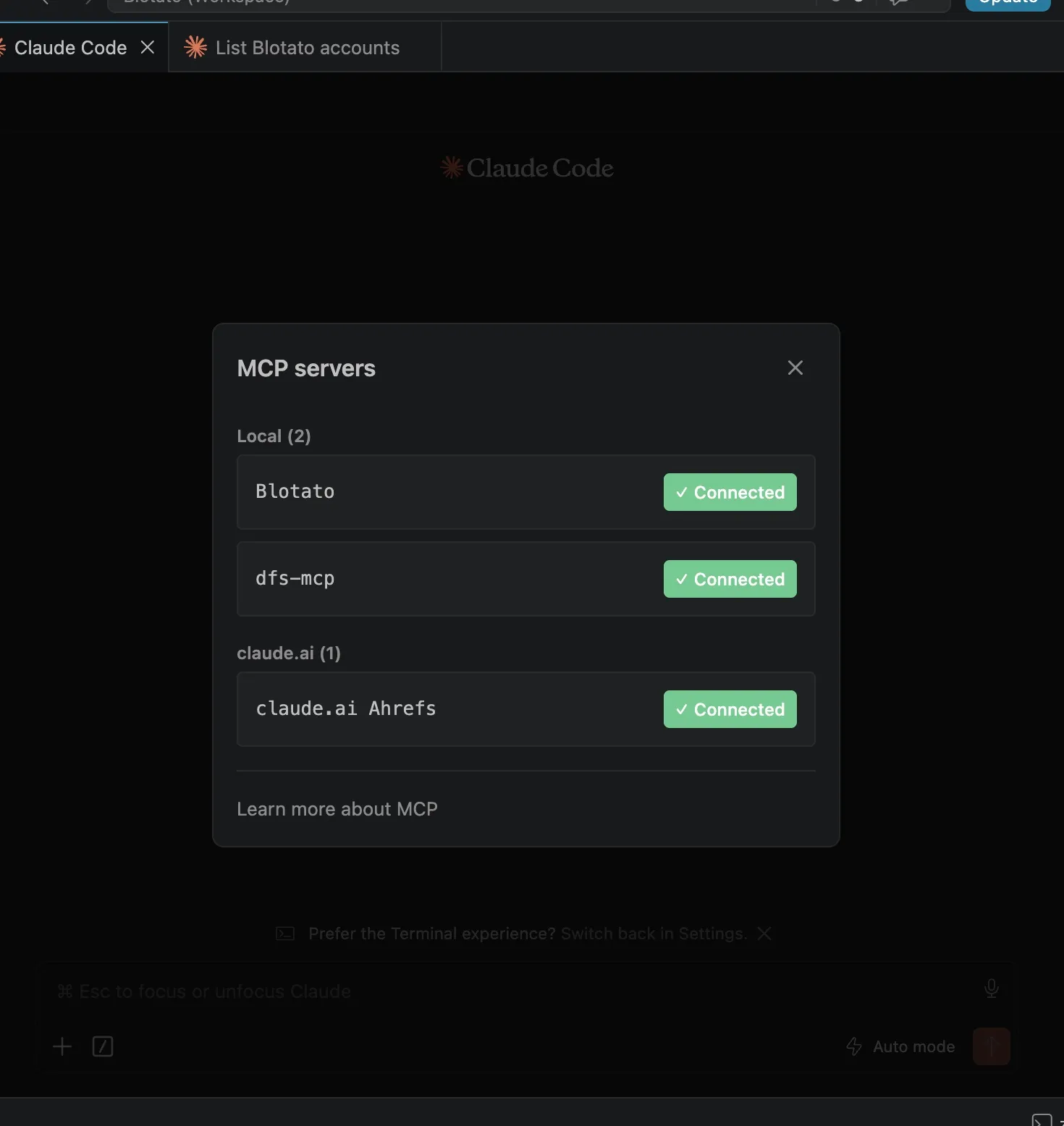
Point Claude Code at the Blotato MCP server, which follows the Model Context Protocol standard Claude Code uses for connectors. Run the line below in a session, then /mcp, pick Blotato > Authenticate, approve, and restart. Claude Desktop uses the same server, added under Customize then Connectors as a custom connector.
claude mcp add --transport http Blotato https://mcp.blotato.com/mcpClaude Code and Claude.ai do not share connector config, so if you also post from the browser you add it there separately. This link does that half without retyping the endpoint.
No API key changes hands, the connection runs off your logged-in browser session. Running this unattended on a server is the one case this walkthrough does not cover, because it needs the blotato-api-key header rather than the browser handshake. The Claude Code agent page has that configuration. Step-by-step screenshots live in Blotato’s MCP setup guide.
Step 3: Confirm the account is visible
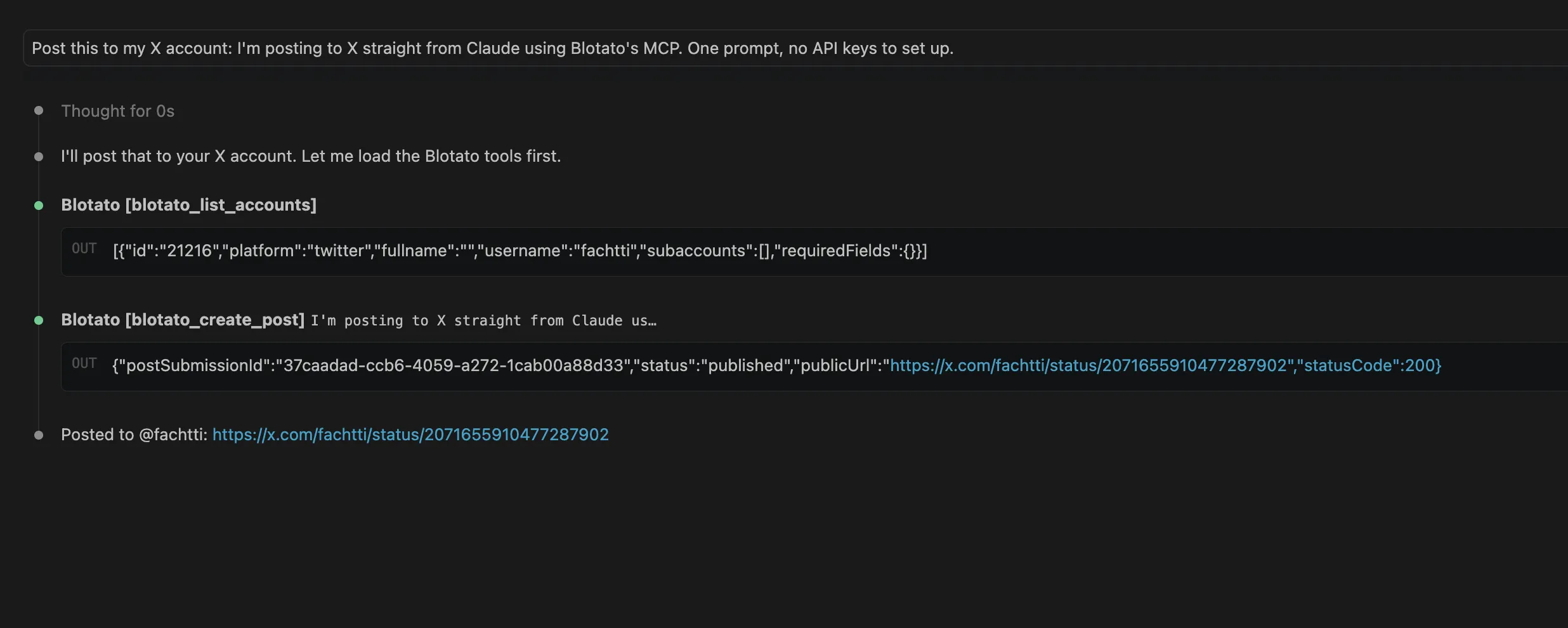
Ask Claude Code to list your connected accounts. It calls blotato_list_accounts and shows each platform with its ID, X among them. If X appears in that list, Claude Code can publish to it. If it does not, redo Step 1 and re-authorize the account in Blotato.
Step 4: Write the prompt that publishes
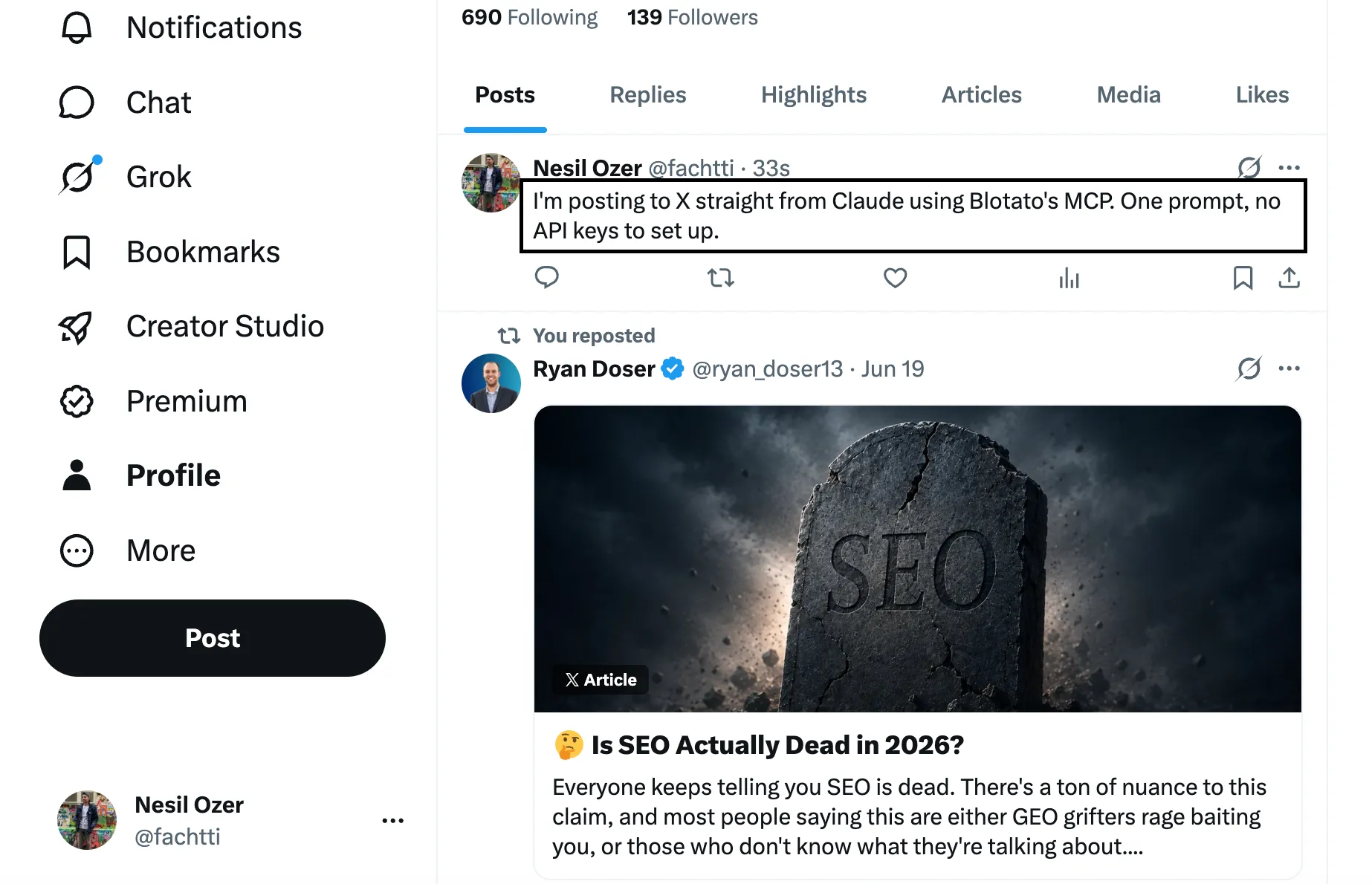
Tell Claude Code what to publish in plain language. A prompt like “Post this to my X account: I’m posting to X straight from Claude using Blotato’s MCP. One prompt, no API keys to set up.” is enough. Claude Code passes that to blotato_create_post as the twitter platform with your account ID and text, then returns a postSubmissionId. Ask it to check blotato_get_post_status and you will see the post flip to published. I leave an approval gate in place, so I read whatever Claude Code drafts before it publishes.
Want Claude Code running more of your stack? See how to post to TikTok with Claude for short video, Bluesky posting from the same prompt if your audience is moving there, or the full Claude Code social media setup for posting everywhere at once.
Step 5: Can Claude Code schedule the post for later?
Include a time and Claude Code passes a scheduledTime through: “post this Tuesday at 10am.” Ask for your next open slot and Blotato drops it into the next gap on your calendar. Queued posts sit in Blotato, ready to move or delete whenever.
If you are still choosing a tool rather than wiring one up, I compared what every major X scheduler charges to reach X separately. The Claude Code angle is that scheduling composes with everything else in your terminal. A queued X post is one line in a script that also ran your tests and pushed your commit, so shipping an announcement can be the last step of a release rather than a task you remember afterward. Threads work the same way here as they do on Threads: one call carrying additionalPosts, published in order at the scheduled time.
Ready to post to X straight from Claude Code? Start with Blotato and wire the MCP server in a couple of minutes.
Why not just build it against the X API?
The Blotato MCP server skips the pay-per-use billing that makes the direct X route expensive in 2026. X moved new developers onto a metered model where you load credits and pay per request on the create-post endpoint, and a post that contains a URL costs $0.20 each, up from a fraction of a cent. Auto-posting links at any volume adds up fast - I broke the full math down in the X (Twitter) API pricing guide and compared seven tools that wrap the X API for you. Routing through Blotato means one flat plan and no trips to the X developer console.
Most “post to X from Claude Code” tools solve a narrower problem. The popular skills on GitHub and the X automation connectors still make you wire the X API v2, create a developer account, and manage your own keys and credits. Single-platform skills publish to X and nothing else, so X, TikTok, and LinkedIn become three separate builds. Blotato links each account once on its own side, then surfaces all nine platforms (X, Instagram, YouTube, TikTok, LinkedIn, Facebook, Threads, Pinterest, Bluesky) behind a single MCP connection. One prompt sends the same idea to X and the rest at once. If you are wiring more than X, the guide covering all nine runs through the quirks platform by platform.
If your drafts pile up faster than you ship them, automating social media with Claude Cowork wires this publishing step onto the front of a full content engine.
What goes wrong the first time?
Newcomers trip on a few of these the first time:
- Expecting it to work on the trial. Neither the API nor the MCP runs on the free trial. Worse, creating an API key from Settings ends that trial right away and rolls you onto the paid Starter plan.
- Pasting over 280 characters on a standard account. X caps standard posts at 280 characters, so a long draft gets rejected unless your account has X Premium. Ask Claude Code to keep the post under that limit, or upgrade for longer text.
- Connecting one X account to two Blotato workspaces. The same X login cannot stay active in two Blotato accounts at once. The newer connection breaks the original token and posts stop going out, so keep each X login in a single workspace.
- Skipping the account connection. Claude Code has nothing to post to until your X account is linked in Blotato. Ask it to list your accounts to check.
Conclusion
Getting Claude Code to post to X takes one connection and one prompt. Link your X account in Blotato, add the MCP server, and tell Claude Code what to publish or schedule. No X developer account, no API v2 keys, no pay-per-use credits like the direct route now demands. Try Blotato and let Claude Code run your X posting.
How to Post to X with Claude Code FAQs
Can Claude Code post to X?
Yes, with help. Claude Code has no native X access, but the Blotato MCP server gives it one. Connect Blotato to Claude Code, link your X account in Blotato, and a prompt like “post this to my X” publishes through Blotato’s API. Claude Desktop works the same way.
How do I connect Claude Code to X?
Connect X inside Blotato’s Settings first, then register Blotato’s MCP server (https://mcp.blotato.com/mcp) in Claude Code with a single claude mcp add command and authenticate. Approving access is the last step, and Claude Code can then publish to that X account. Claude Desktop adds the same server as a custom connector.
Does Claude have an X (Twitter) connector?
Not a native one. Claude and Claude Code reach X through an MCP server instead of a built-in connector. Blotato’s MCP server (https://mcp.blotato.com/mcp) is that bridge: Blotato holds the X connection and covers the metered API cost on its side, so you post from a plain-language prompt without loading X API credits yourself.
Do you need the X API to post to X with Claude Code?
No. Blotato authenticates with X on its side, so you skip the developer account, the API v2 keys, and the pay-per-use credits entirely. You link X once in Blotato, and Claude Code publishes through Blotato rather than calling the X API directly.
Can Claude Code schedule X posts for later?
Yes. Add a time to the prompt and Claude Code schedules the post through Blotato instead of firing it now. Pick the exact minute, or tell Blotato to grab your next open calendar slot. It stays in Blotato until then, editable or removable.
Does Claude Code need my X password?
No, and it should never have it. Authorization runs through the platform’s own OAuth screen, which issues a scoped token without exposing your credentials. Claude Code only sees the publishing tools the MCP server exposes, never your login.
Will X flag posts published this way as automated?
It depends on whether X treats you as an automated account, which its documents do not define for someone scheduling their own posts through a tool. Its Developer Guidelines say automated accounts using the X API must enable the Automated profile label, and its Developer Policy requires a bot account to clearly indicate what it is and who is responsible for it. Its Automation rules allow automated posts on your own account for entertainment, informational or novelty purposes. What its rules target is automation that games engagement, such as bulk duplicate posting or coordinated activity across accounts.
Can Claude Code read my X analytics too?
Yes, on X. Metrics are collected on every Blotato platform but LinkedIn, X included, so you can ask Claude Code to pull performance data back off your posts.
What does this cost?
X is the platform where the pricing comparison is least ambiguous, because X charges for write access directly. Going straight to the X API means picking a paid tier and living inside its post cap. Going through Blotato means $29/mo flat for 20 connected accounts, with X as one of them and no separate X API bill. That stops being the better deal the moment X is the only platform you publish to and you need the parts of its API that a publishing layer does not expose, like reading the timeline or pulling follower analytics, in which case pay X directly and skip this entirely. One billing detail that catches developers: the trial does not cover the API, and generating a key converts you to paid Starter on the spot.
For the reference version of this setup, including every X action Claude Code can call, see the X MCP server page.