How to Set Up Social Media in Cline
Cline connects to a social media MCP server through its mcp.json, using three fields: type, url, and headers. Set type to streamableHttp, point url at https://mcp.blotato.com/mcp, add blotato-api-key as a header, and Cline can publish and schedule across nine platforms from either the VS Code panel or the CLI. The type field is the one people leave out, and leaving it out is why a correct URL still fails to connect.
https://mcp.blotato.com/mcp API key header Updated August 2026
How to connect Cline to social media
- Connect your social accounts in Blotato and copy your API key from Settings then API.
- Open the config: ~/.cline/mcp.json for the CLI, or in the extension click the MCP Servers icon, then the Configure tab, then Configure MCP Servers.
- Add the server with type set to streamableHttp, url set to https://mcp.blotato.com/mcp, and blotato-api-key in headers.
- Save. Cline reloads the server list, and the Blotato tools appear under the server name you chose.
{
  "mcpServers": {
    "blotato": {
      "type": "streamableHttp",
      "url": "https://mcp.blotato.com/mcp",
      "headers": {
        "blotato-api-key": "YOUR_API_KEY"
      },
      "disabled": false,
      "autoApprove": []
    }
  }
}
Cline picks its transport from the `type` field, and leaving it out falls back to the legacy SSE transport rather than erroring, which reads as the endpoint being broken. Set "type": "streamableHttp" explicitly.
How do I know it worked?
Ask Cline to list your connected accounts. It calls
blotato_list_accounts and returns your platforms, which confirms both the connection and
the authentication in one step. If you see your accounts, setup is done.
What social media accounts do I have connected?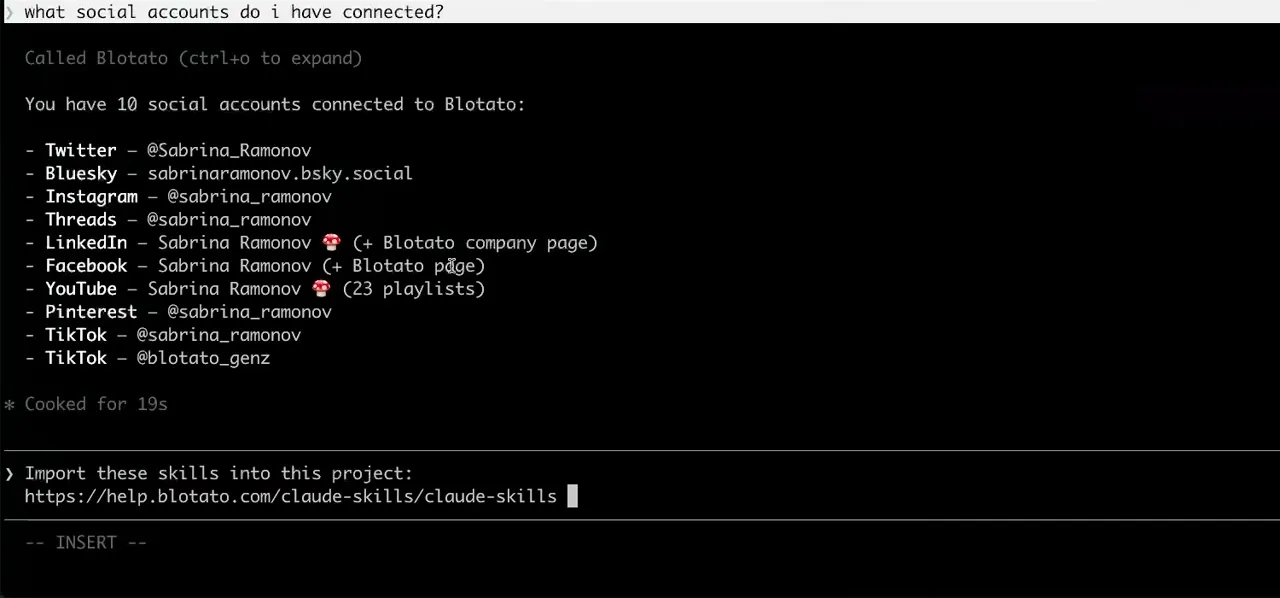
Worth knowing before you rely on it: when an agent ranks your best posts through MCP, metrics cover X, Instagram, Facebook, Threads, and Bluesky. TikTok, YouTube, and Pinterest analytics are available in the Blotato web app and REST API, and LinkedIn publishes normally but reports no metrics yet.
What to ask Cline once it is connected
- Ship the release note I just wrote to LinkedIn and X.
- blotato_list_accounts to resolve both accounts, then blotato_create_post per platform using the text already in the editor buffer.
- Did the post from an hour ago actually go out?
- blotato_get_post_status, which is the check worth wiring in because publishing is asynchronous: the create call returns a submission id, not proof of a live post.
- What are my best performing posts this month?
- blotato_list_top_posts, sorted by views by default. Analytics covers eight platforms and returns nothing for LinkedIn yet.
What breaks, and how to fix it
The Cline-specific failure is a config that looks complete and connects to nothing, because the type field was omitted. Cline treats a missing type as the legacy SSE transport for backward compatibility rather than raising an error, so a hosted streamable HTTP endpoint sits there failing quietly against the wrong protocol. Set "type": "streamableHttp" and it connects. The second thing to check is which surface you configured: the docs give the CLI its own file at ~/.cline/mcp.json and route the IDE extension through its Configure MCP Servers panel, so when tools show up in one and not the other, confirm the config reached the surface you are actually running.
What is different about Cline
Cline is the only client here that has you choose the transport explicitly and treats the absence of that choice as a legacy default rather than an error, which turns one missing line into a silent failure instead of a loud one. It is also unusual in offering three documented routes to a working server: hand-editing mcp.json, a Remote Servers tab where you pick Streamable HTTP or SSE from a menu, and an interactive wizard at `cline mcp` that prompts for the name, transport, URL, and headers in order. The wizard is the fastest way to avoid the type mistake entirely, because it never lets the field go unset.
Vendor documentation: Cline MCP setup. For how a client discovers and calls tools once connected, see the MCP client concepts reference.
Cline social media FAQs
01 Can Cline post to social media?
02 How do I connect Cline to social media?
03 How do I set up Cline for social media?
04 What is the best way to manage social media with Cline?
05 What goes wrong when connecting Cline?
06 Does Cline need to be running for a scheduled post to go out?
07 What can I ask Cline to do once it is connected?
08 How much does it cost to connect Cline?
Connecting a different agent?
Same endpoint, same accounts, one setup per client. The AI agents for social media hub covers what all of them share, including every tool your agent can call.













 Blotato
 Your AI Agent still can't post to social media.
Point Claude, ChatGPT, n8n, or your own agent at Blotato's MCP and that's fixed: 9 platforms behind one key, flat $29/mo.
Connect your agentFlat pricing. Cancel anytime.