How to Post to Social Media From GitHub Copilot
GitHub Copilot agent mode reads MCP servers from an mcp.json file. Add a server with type set to http and url set to https://mcp.blotato.com/mcp, authenticate with either a blotato-api-key header or the oauth field, and Copilot can publish and schedule across nine platforms from the editor. Where you put that file matters more than usual here, because the workspace .vscode/mcp.json and the file the Agent Host reads are not the same path.
https://mcp.blotato.com/mcp OAuth or header Updated August 2026
How to connect GitHub Copilot to social media
- Connect your social accounts in Blotato and copy your API key from Settings then API.
- Create a workspace .mcp.json, or a user-level ~/.copilot/mcp-config.json, which the Agent Host reads natively.
- Add the server under "servers" with type set to http, url set to https://mcp.blotato.com/mcp, and blotato-api-key in headers.
- Open the Chat view, switch to agent mode, and confirm the Blotato tools are listed in the tools picker before running anything against a live account.
{
  "servers": {
    "blotato": {
      "type": "http",
      "url": "https://mcp.blotato.com/mcp",
      "headers": {
        "blotato-api-key": "YOUR_API_KEY"
      }
    }
  }
}
Two different products carry this name. Copilot agent mode in VS Code is the one described here, and it accepts both OAuth and a header. Copilot cloud agent on github.com also takes remote MCP servers, but does not support OAuth for them and reads secrets from COPILOT_MCP_-prefixed variables instead, so a config that works in one is not guaranteed in the other.
How do I know it worked?
Ask GitHub Copilot to list your connected accounts. It calls
blotato_list_accounts and returns your platforms, which confirms both the connection and
the authentication in one step. If you see your accounts, setup is done.
What social media accounts do I have connected?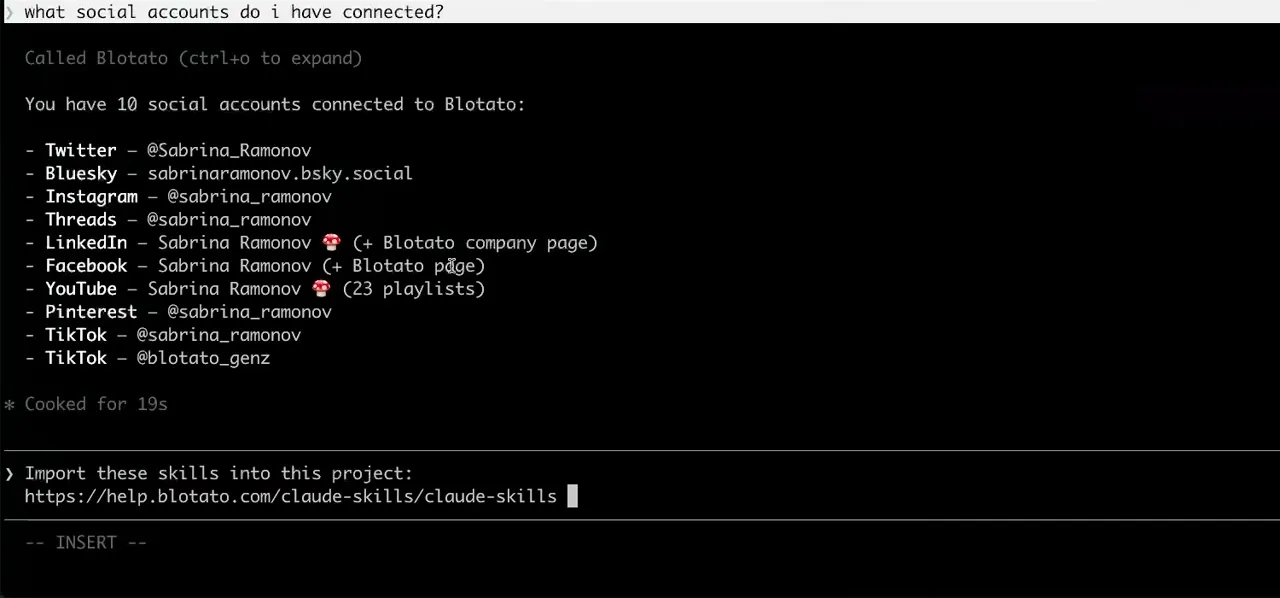
Worth knowing before you rely on it: when an agent ranks your best posts through MCP, metrics cover X, Instagram, Facebook, Threads, and Bluesky. TikTok, YouTube, and Pinterest analytics are available in the Blotato web app and REST API, and LinkedIn publishes normally but reports no metrics yet.
What to ask GitHub Copilot once it is connected
- Announce this pull request on X once I merge it.
- blotato_create_post with the text drafted from the diff already open, so the announcement is written where the change is rather than retyped later.
- Schedule these four posts across next week instead of firing them now.
- blotato_create_post with a scheduled time per post, or useNextFreeSlot to drop them into the slots already configured. Scheduling runs on Blotato, so the posts go out with VS Code closed.
- Reply to the comments on yesterday's Instagram post.
- blotato_list_comments to read them, then blotato_post_comment per reply. Comments cover Instagram and Facebook.
What breaks, and how to fix it
The trap here is the one the VS Code docs flag themselves: servers requiring interactive input are not forwarded to the Agent Host, and ${input:...} variables count as interactive input. So the tidy pattern of routing an API key through an input variable is exactly what stops the server reaching the agent, and it fails by absence, with the server simply missing rather than erroring. The related path issue is that the Agent Host does not read .vscode/mcp.json directly, so a config that works in the chat panel can be invisible to the agent. Use a workspace .mcp.json or ~/.copilot/mcp-config.json with the key written literally, and keep that file out of version control.
What is different about GitHub Copilot
Two separate products ship under this name and they do not authenticate the same way. Copilot agent mode inside VS Code supports an oauth object on the server entry, so it can run the browser consent flow on first connection instead of holding a key at all. Copilot cloud agent on github.com also accepts remote MCP servers, but GitHub's docs state it does not support OAuth for them: the key goes in an Agents secret prefixed COPILOT_MCP_ instead, so a config proven in the editor is not automatically valid there. Worth knowing before you promise a teammate that the setup transfers.
Vendor documentation: GitHub Copilot MCP setup. For how a client discovers and calls tools once connected, see the MCP client concepts reference.
GitHub Copilot social media FAQs
01 Can GitHub Copilot post to social media?
02 How do I connect GitHub Copilot to social media?
03 How do I set up GitHub Copilot for social media?
04 What is the best way to manage social media with GitHub Copilot?
05 What goes wrong when connecting GitHub Copilot?
06 Does GitHub Copilot need to be running for a scheduled post to go out?
07 What can I ask GitHub Copilot to do once it is connected?
08 How much does it cost to connect GitHub Copilot?
Connecting a different agent?
Same endpoint, same accounts, one setup per client. The AI agents for social media hub covers what all of them share, including every tool your agent can call.













 Blotato
 Your AI Agent still can't post to social media.
Point Claude, ChatGPT, n8n, or your own agent at Blotato's MCP and that's fixed: 9 platforms behind one key, flat $29/mo.
Connect your agentFlat pricing. Cancel anytime.