
Hermes Agent Social Media MCP Setup
Hermes Agent takes a URL plus headers in its MCP config and supports OAuth 2.1 with PKCE, so a hosted social media server drops straight in. One detail to get right first: Hermes configures MCP servers in YAML under the snake_case key mcp_servers, not in the JSON mcpServers block most other clients use, so a config copied from Cursor or Claude Code will not load. This matters more on Hermes than on most agents, because its native social skill covers X only, and every other platform arrives through the MCP connection rather than a setting.
https://mcp.blotato.com/mcp OAuth or header Updated August 2026
How to connect Hermes Agent to social media
- Connect your social accounts in Blotato.
- Open ~/.hermes/config.yaml and add the Blotato server under mcp_servers, using the URL https://mcp.blotato.com/mcp.
- Authenticate with a blotato-api-key header, or over OAuth 2.1 with PKCE. Keep the key itself in ~/.hermes/.env and reference it, rather than pasting it into the config.
- Restart the agent and confirm the tools are listed.
mcp_servers:
  blotato:
    url: "https://mcp.blotato.com/mcp"
    headers:
      blotato-api-key: "${env:BLOTATO_API_KEY}"
    enabled: true
How do I know it worked?
Ask Hermes Agent to list your connected accounts. It calls
blotato_list_accounts and returns your platforms, which confirms both the connection and
the authentication in one step. If you see your accounts, setup is done.
What social media accounts do I have connected?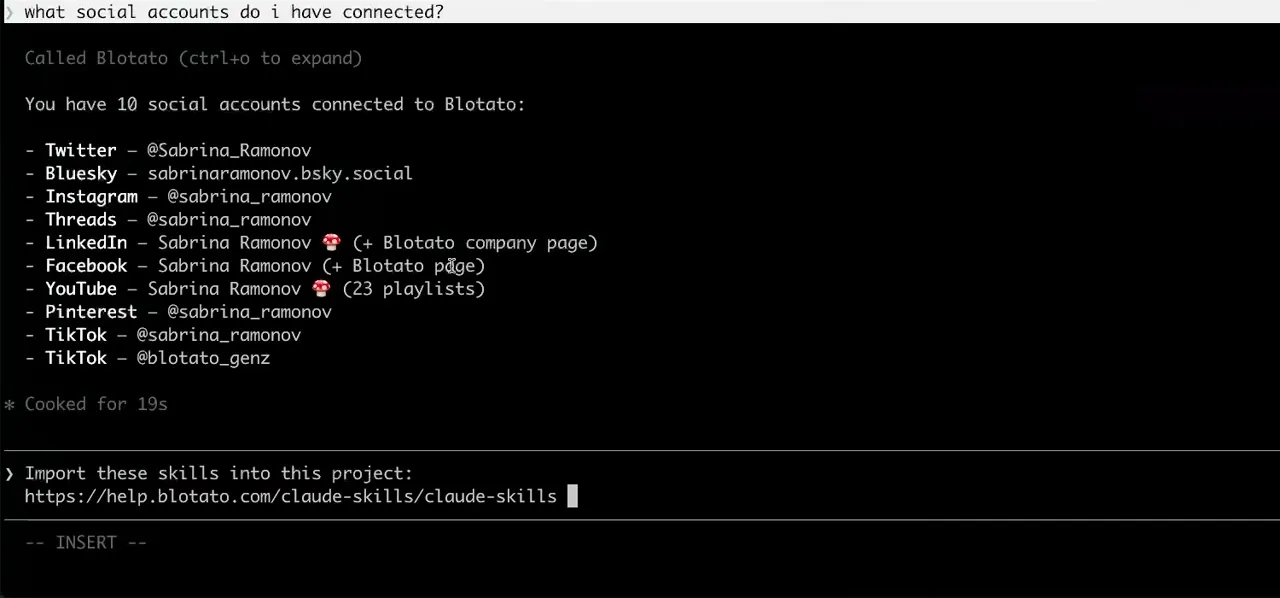
Worth knowing before you rely on it: when an agent ranks your best posts through MCP, metrics cover X, Instagram, Facebook, Threads, and Bluesky. TikTok, YouTube, and Pinterest analytics are available in the Blotato web app and REST API, and LinkedIn publishes normally but reports no metrics yet.
What to ask Hermes Agent once it is connected
- Post this to LinkedIn.
- blotato_create_post. This is the request Hermes cannot serve on its own: the native skill covers X and nothing else, so LinkedIn arrives through the MCP connection or not at all.
- Cross-post my last X post everywhere else.
- blotato_list_posts to fetch it, then blotato_create_post per platform. The native skill wrote the original, and the eight other destinations come from the server.
- Put this on Instagram as a story.
- blotato_create_post with mediaType set to story. Note that firstComment is not supported on stories, and interactive stickers need manual editing in Instagram, so an agent cannot add a clickable link to a story.
What breaks, and how to fix it
Two things go wrong here. The first is format: Hermes expects YAML under mcp_servers, so pasting a JSON mcpServers block from another client produces a config the agent silently ignores. The second is a wrong assumption about scope. People treat the native X skill as the general social capability and go looking for a flag that switches on the other networks. They do not exist natively at all, so nothing in the Hermes config will enable them. They come from the MCP server or not at all.
What is different about Hermes Agent
Hermes is the only agent in this silo that ships a native posting skill of its own, which makes it the only one where the question is not whether it can post but which platforms it already reaches without help.
Vendor documentation: Hermes Agent MCP setup. For how a client discovers and calls tools once connected, see the MCP client concepts reference.
Already connected and want the workflow?
This page covers the connection. Our guide to making Hermes Agent post to every platform covers what the native X skill does, and why the other eight platforms are harder.
Hermes Agent social media FAQs
01 Can Hermes Agent post to social media?
02 How do I connect Hermes Agent to social media?
03 How do I set up Hermes Agent for social media?
04 What is the best way to manage social media with Hermes Agent?
05 What goes wrong when connecting Hermes Agent?
06 Does Hermes Agent need to be running for a scheduled post to go out?
07 What can I ask Hermes Agent to do once it is connected?
08 How much does it cost to connect Hermes Agent?
Connecting a different agent?
Same endpoint, same accounts, one setup per client. The AI agents for social media hub covers what all of them share, including every tool your agent can call.












 Blotato
 Your AI Agent still can't post to social media.
Point Claude, ChatGPT, n8n, or your own agent at Blotato's MCP and that's fixed: 9 platforms behind one key, flat $29/mo.
Connect your agentFlat pricing. Cancel anytime.