
OpenClaw Social Media MCP Setup
OpenClaw registers a social media MCP server from the command line rather than a config file you hand-edit. Run openclaw mcp add with the Blotato URL and a header, and the server joins OpenClaw's own client-side registry, which it then projects into eligible runtimes. Because OpenClaw is self-hosted you get both auth paths: a header for unattended runs, or openclaw mcp login for OAuth.
https://mcp.blotato.com/mcp OAuth or header Updated August 2026
How to connect OpenClaw to social media
- Connect your social accounts in Blotato and copy your API key from Settings then API.
- Register the server: openclaw mcp add with --url https://mcp.blotato.com/mcp and a --header flag carrying your key.
- Check it registered with openclaw mcp list, then openclaw mcp probe blotato to connect and confirm the tools it exposes.
- For OAuth instead of a header, use openclaw mcp login rather than passing --header.
openclaw mcp add blotato --url https://mcp.blotato.com/mcp --transport streamable-http --header blotato-api-key:YOUR_API_KEYHow do I know it worked?
Ask OpenClaw to list your connected accounts. It calls
blotato_list_accounts and returns your platforms, which confirms both the connection and
the authentication in one step. If you see your accounts, setup is done.
What social media accounts do I have connected?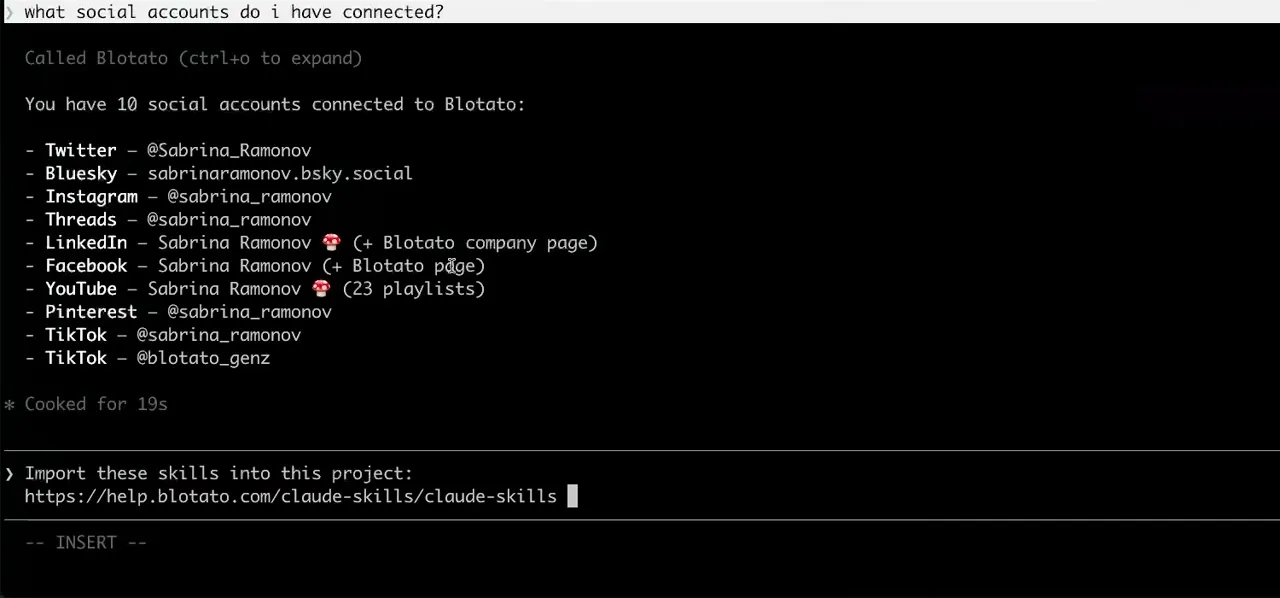
Worth knowing before you rely on it: when an agent ranks your best posts through MCP, metrics cover X, Instagram, Facebook, Threads, and Bluesky. TikTok, YouTube, and Pinterest analytics are available in the Blotato web app and REST API, and LinkedIn publishes normally but reports no metrics yet.
What to ask OpenClaw once it is connected
- Every morning, turn yesterday's notes into a post and publish it.
- A scheduled OpenClaw run ending in blotato_create_post. This is the unattended case the header auth exists for, since an expired OAuth session on a self-hosted agent stops publishing with nobody watching.
- Did anything fail overnight?
- blotato_list_posts plus blotato_get_post_status on anything still pending. Worth logging, because an async publish that failed at 3am looks identical to one that never ran.
- Show me what tools this server actually exposes.
- openclaw mcp probe blotato connects and reports them. Note that openclaw mcp tools is a different command: it sets the include and exclude filters, which is how you hand an unattended agent publishing without the tools that spend credits.
- Show me every DM automation on the account before I let the agent near them.
- blotato_list_automations returns the automations on the account the key authenticates, each with its active or draft state. The reason to run it on a self-hosted agent: automations execute on Blotato's side whether or not OpenClaw is up, so the set the agent can reach with blotato_update_automation and blotato_delete_automation is worth reading before it has them.
What breaks, and how to fix it
The consideration specific to a self-hosted agent is that nothing supervises it. If you run OpenClaw unattended, the header path is safer, because an OAuth session that expires while nobody is watching turns into an agent that silently stops publishing rather than one that prompts you to reconnect. If tools do not appear, openclaw mcp doctor checks the saved definition for local problems and openclaw mcp probe connects to the server for live proof, which is the pair worth running before you start editing config by hand.
What is different about OpenClaw
OpenClaw is the only client here that is both an MCP server and an MCP client: openclaw mcp serve exposes OpenClaw itself, while the other subcommands manage outbound servers like Blotato. It also has a real CLI registry with doctor and probe diagnostics, so you debug a connection with commands rather than by re-reading a JSON file, and per-server include and exclude filters so an unattended agent can hold the publishing tools without the ones that spend credits.
Vendor documentation: OpenClaw MCP setup. For how a client discovers and calls tools once connected, see the MCP client concepts reference.
Already connected and want the workflow?
This page covers the connection. Our guide to building a social media manager on OpenClaw covers skill file versus CLI versus MCP, and what breaks when an agent posts unattended.
OpenClaw social media FAQs
01 Can OpenClaw post to social media?
02 How do I connect OpenClaw to social media?
03 How do I set up OpenClaw for social media?
04 What is the best way to manage social media with OpenClaw?
05 What goes wrong when connecting OpenClaw?
06 Does OpenClaw need to be running for a scheduled post to go out?
07 What can I ask OpenClaw to do once it is connected?
08 How much does it cost to connect OpenClaw?
Connecting a different agent?
Same endpoint, same accounts, one setup per client. The AI agents for social media hub covers what all of them share, including every tool your agent can call.












 Blotato
 Your AI Agent still can't post to social media.
Point Claude, ChatGPT, n8n, or your own agent at Blotato's MCP and that's fixed: 9 platforms behind one key, flat $29/mo.
Connect your agentFlat pricing. Cancel anytime.