Replit Agent Social Media MCP Setup
Replit Agent connects to a social media MCP server by adding it as a custom integration by URL, rather than by pasting a JSON config file. Add https://mcp.blotato.com/mcp as a custom MCP server in Replit Integrations, and Agent fetches the tool list automatically and makes it available across all your projects.
https://mcp.blotato.com/mcp API key header Updated August 2026
How to connect Replit Agent to social media
- Connect your social accounts in Blotato and copy your API key from Settings then API.
- In Replit, open Integrations and choose to add a custom MCP server, since Blotato is not in the pre-listed catalog.
- Set the base URL to https://mcp.blotato.com/mcp and supply your API key.
- Mention the server in an Agent chat. Agent fetches the tool list and picks the right tool for the request.
Base URL:  https://mcp.blotato.com/mcp
API key:   YOUR_API_KEY
How do I know it worked?
Ask Replit Agent to list your connected accounts. It calls
blotato_list_accounts and returns your platforms, which confirms both the connection and
the authentication in one step. If you see your accounts, setup is done.
What social media accounts do I have connected?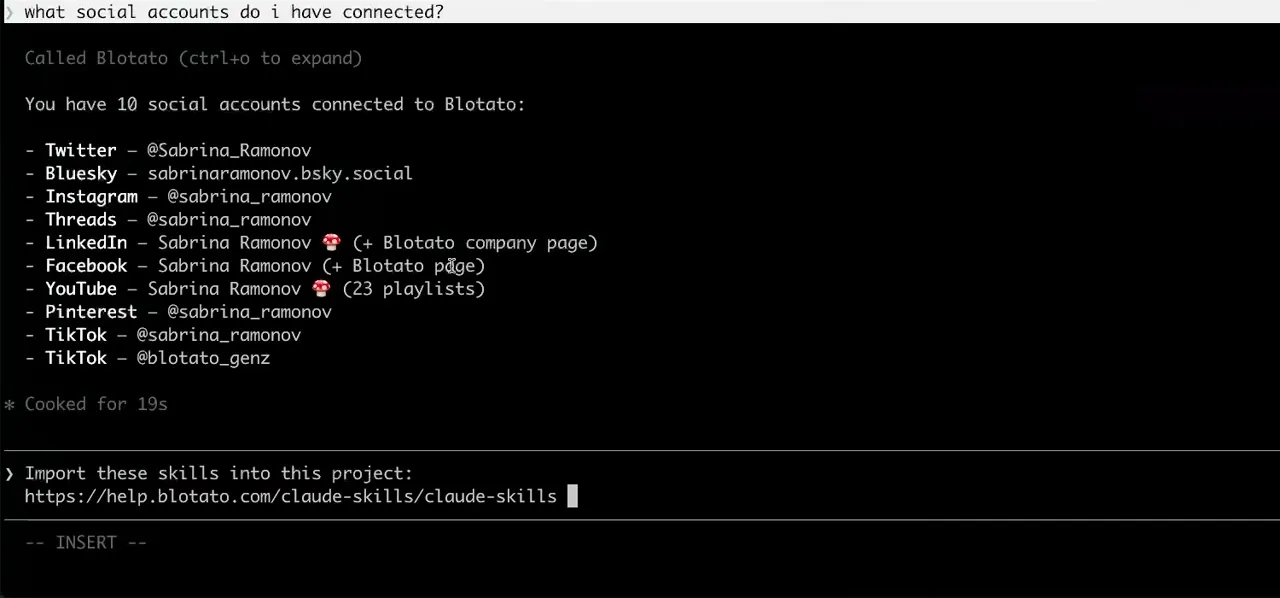
Worth knowing before you rely on it: when an agent ranks your best posts through MCP, metrics cover X, Instagram, Facebook, Threads, and Bluesky. TikTok, YouTube, and Pinterest analytics are available in the Blotato web app and REST API, and LinkedIn publishes normally but reports no metrics yet.
What to ask Replit Agent once it is connected
- When someone submits the form, post their testimonial to X.
- The app you are building calls blotato_create_post through Agent. The publishing is a feature of the thing you shipped rather than a manual step you do afterwards.
- Announce the deploy on LinkedIn.
- blotato_create_post, but expect Agent to ask for confirmation before it runs. A post that has not appeared is usually waiting on that prompt rather than failing.
- Check the account is still connected before posting.
- blotato_get_user returns the account and its subscription status, which is worth calling first in anything that runs on its own: API access depends on an active paid plan, so it is better checked up front than discovered by a publish that fails.
- Set up the lead-magnet DM automation for the launch post.
- blotato_create_automation creates it as a draft unless the call passes isActive: true, which is the trap in code that runs unattended: the new automation is saved and never fires, with nothing reporting an error. blotato_update_automation sets it active, and test it by commenting from a different account, because a comment from the account that owns the automation is skipped.
What breaks, and how to fix it
The thing to know on Replit is that Agent asks for confirmation before running a tool that needs it, so a publish can sit waiting on a prompt rather than failing outright. If a post has not appeared, check for a pending confirmation in the chat before re-checking the connection. Blotato is also not in the pre-listed catalog, so use the custom-server path rather than looking for it by name.
What is different about Replit Agent
Replit connects MCP servers at the account level rather than per project, so a server added once is available across every project you build, and Agent fetches the tool list itself instead of you declaring tools. It is also the only client here with a shareable install link, which encodes the server name and base URL into a one-click Add to Replit badge.
Vendor documentation: Replit Agent MCP setup. For how a client discovers and calls tools once connected, see the MCP client concepts reference.
Replit Agent social media FAQs
01 Can Replit Agent post to social media?
02 How do I connect Replit Agent to social media?
03 How do I set up Replit Agent for social media?
04 What is the best way to manage social media with Replit Agent?
05 What goes wrong when connecting Replit Agent?
06 Does Replit Agent need to be running for a scheduled post to go out?
07 What can I ask Replit Agent to do once it is connected?
08 How much does it cost to connect Replit Agent?
Connecting a different agent?
Same endpoint, same accounts, one setup per client. The AI agents for social media hub covers what all of them share, including every tool your agent can call.













 Blotato
 Your AI Agent still can't post to social media.
Point Claude, ChatGPT, n8n, or your own agent at Blotato's MCP and that's fixed: 9 platforms behind one key, flat $29/mo.
Connect your agentFlat pricing. Cancel anytime.