
NanoClaw Social Media MCP Setup
NanoClaw registers MCP servers by launching a local command rather than by taking a server URL, so a hosted endpoint reaches it through a bridge process instead of a URL field. Its documentation covers registering any stdio MCP server into a group’s container config with the ncl groups config add-mcp-server command. This is one more step than the other agents on this list, not a different destination.
https://mcp.blotato.com/mcp Via an stdio bridge Updated August 2026
How to connect NanoClaw to social media
- Connect your social accounts in Blotato and copy your API key from Settings then API.
- Register a stdio MCP server into the group you want, using ncl groups config add-mcp-server.
- Point the registered command at a standard stdio-to-HTTP bridge such as mcp-remote, targeting https://mcp.blotato.com/mcp.
- Restart the group so the container picks up the new server.
ncl groups config add-mcp-server --id YOUR_GROUP_ID --name blotato \
  --command npx \
  --args '["mcp-remote","https://mcp.blotato.com/mcp","--header","blotato-api-key:YOUR_API_KEY"]'
NanoClaw documents registering stdio MCP servers in a group container config rather than a remote URL, so point it at Blotato with a standard stdio-to-HTTP bridge such as mcp-remote. One extra step, same endpoint.
How do I know it worked?
Ask NanoClaw to list your connected accounts. It calls
blotato_list_accounts and returns your platforms, which confirms both the connection and
the authentication in one step. If you see your accounts, setup is done.
What social media accounts do I have connected?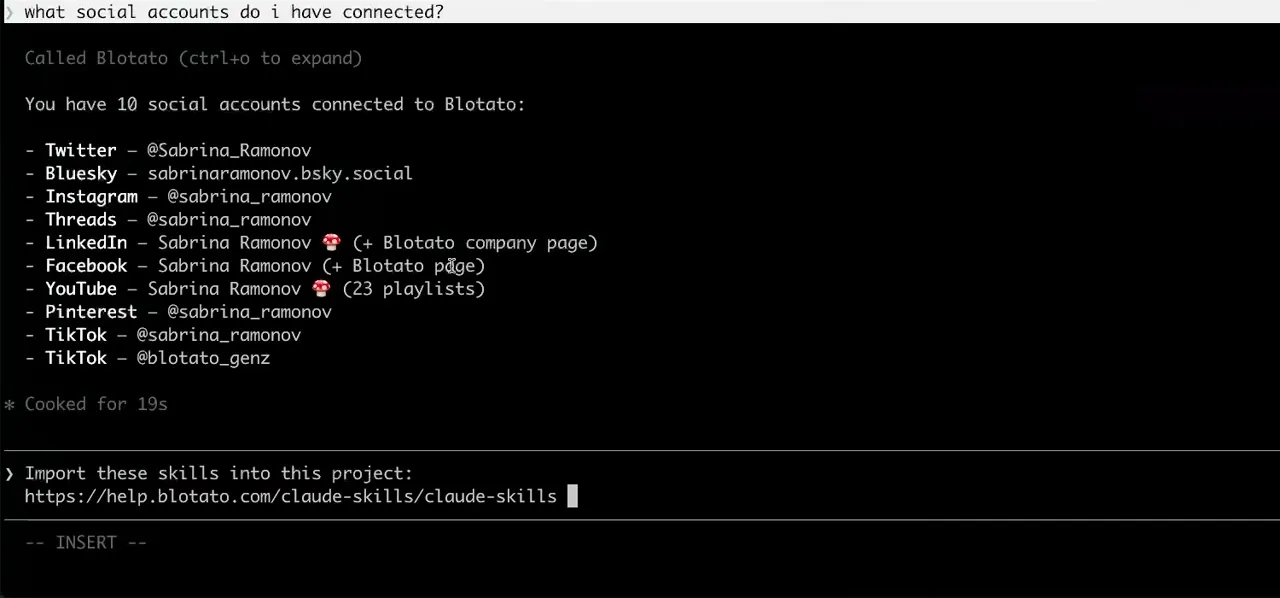
Worth knowing before you rely on it: when an agent ranks your best posts through MCP, metrics cover X, Instagram, Facebook, Threads, and Bluesky. TikTok, YouTube, and Pinterest analytics are available in the Blotato web app and REST API, and LinkedIn publishes normally but reports no metrics yet.
What to ask NanoClaw once it is connected
- Post this to Threads.
- blotato_create_post, reaching the hosted endpoint through the bridge process rather than a URL field. Once the bridge is registered the prompts are identical to every other agent here.
- List my connected accounts.
- blotato_list_accounts, and on NanoClaw this is the request worth making first: it proves the bridge process is actually running. A group that restarted without it fails the same way an agent that simply cannot post does.
- Schedule this for tomorrow morning.
- blotato_create_post with a scheduledTime. The schedule runs on Blotato, so the queued post publishes even if the group container is not running at the time.
What breaks, and how to fix it
NanoClaw is the one setup here we have not run end to end against Blotato. Its documentation is explicit that servers register as stdio commands in a group container config and that there is no remote URL field, and a stdio-to-HTTP bridge is the standard answer to exactly that shape. Treat the bridge step as the documented pattern rather than a verified recipe, and expect to spend more time here than on a client with a URL field.
What is different about NanoClaw
NanoClaw is the only agent in this silo that cannot take a hosted endpoint directly, because it registers servers as local commands scoped to a group container rather than as URLs. Everything else here is a URL and a header.
Vendor documentation: NanoClaw MCP setup. The bridge itself is mcp-remote, the standard stdio-to-HTTP proxy for clients that cannot take a URL.
NanoClaw social media FAQs
01 Can NanoClaw post to social media?
02 How do I connect NanoClaw to social media?
03 How do I set up NanoClaw for social media?
04 What is the best way to manage social media with NanoClaw?
05 What goes wrong when connecting NanoClaw?
06 Does NanoClaw need to be running for a scheduled post to go out?
07 What can I ask NanoClaw to do once it is connected?
08 How much does it cost to connect NanoClaw?
Connecting a different agent?
Same endpoint, same accounts, one setup per client. The AI agents for social media hub covers what all of them share, including every tool your agent can call.












 Blotato
 Your AI Agent still can't post to social media.
Point Claude, ChatGPT, n8n, or your own agent at Blotato's MCP and that's fixed: 9 platforms behind one key, flat $29/mo.
Connect your agentFlat pricing. Cancel anytime.