Perplexity Social Media Connector Setup
Perplexity Computer accepts custom remote MCP connectors with None, API Key, or OAuth 2.0 authentication. Add Blotato at https://mcp.blotato.com/mcp, choosing streamable HTTP as the transport. On an organization plan there is a gate worth knowing about first: an admin has to enable custom connectors before the option appears.
https://mcp.blotato.com/mcp OAuth or API key Updated August 2026
How to connect Perplexity Computer to social media
- Connect your social accounts in Blotato.
- On an organization plan, have an admin enable custom connectors first.
- In Perplexity, add a custom remote connector and choose streamable HTTP as the transport.
- Set the URL to https://mcp.blotato.com/mcp and authenticate with an API key or OAuth.
URL:        https://mcp.blotato.com/mcp
Transport:  streamable HTTP
Auth:       API Key or OAuth 2.0
Add Blotato under custom remote connectors, choosing streamable HTTP as the transport. On an organization plan an admin has to enable custom connectors first, and a connector stays private to you until it is shared.
How do I know it worked?
Ask Perplexity Computer to list your connected accounts. It calls
blotato_list_accounts and returns your platforms, which confirms both the connection and
the authentication in one step. If you see your accounts, setup is done.
What social media accounts do I have connected?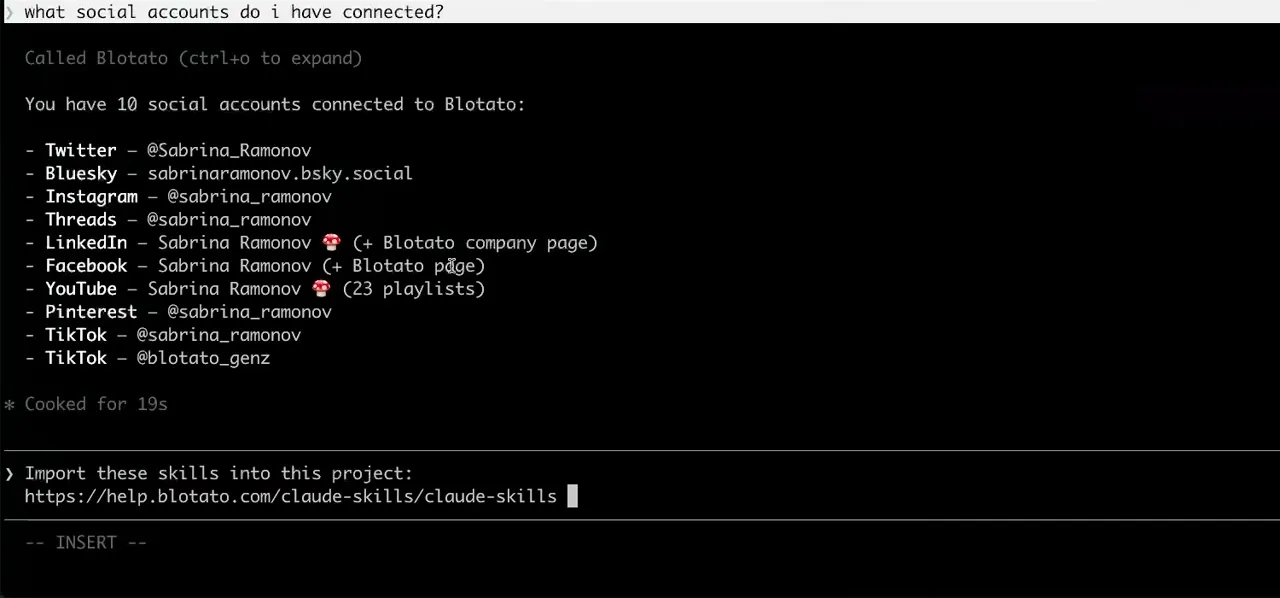
Worth knowing before you rely on it: when an agent ranks your best posts through MCP, metrics cover X, Instagram, Facebook, Threads, and Bluesky. TikTok, YouTube, and Pinterest analytics are available in the Blotato web app and REST API, and LinkedIn publishes normally but reports no metrics yet.
What to ask Perplexity Computer once it is connected
- Research what competitors shipped this week, then post our take on LinkedIn.
- Perplexity does the research half natively and the publishing half through blotato_create_post. It is the one client here where the source material and the post come from the same tool.
- Post this to Threads and Bluesky as well.
- Two more blotato_create_post calls. Both platforms take threads through additionalPosts if the take runs long.
- How did last week's post perform?
- blotato_get_post_analytics for a specific post, on every platform except LinkedIn, which returns no metrics yet.
- Which of my Instagram automations is actually converting?
- blotato_get_automation_analytics returns all-time run totals for one automation, and blotato_list_automations gives you the set to compare across. Read the totals against the monthly active-contacts limit, 1,000 on Starter, 6,000 on Creator and 15,000 on Agency, counting a contact once per connected account: the same person reached on two Facebook Pages is two contacts, not one.
What breaks, and how to fix it
The Perplexity-specific surprise is visibility rather than authentication. A connector you add stays private to you until it is shared, so a teammate who cannot see it is not misconfigured. On an org plan, if the custom connector option is missing entirely, that is the admin gate rather than a problem with the endpoint.
What is different about Perplexity Computer
Perplexity is the only client here with an organization-level permission gate in front of custom connectors, which means the blocker can sit with an admin rather than anywhere in your own setup.
Vendor documentation: Perplexity Computer MCP setup. For how a client discovers and calls tools once connected, see the MCP client concepts reference.
Perplexity Computer social media FAQs
01 Can Perplexity Computer post to social media?
02 How do I connect Perplexity Computer to social media?
03 How do I set up Perplexity Computer for social media?
04 What is the best way to manage social media with Perplexity Computer?
05 What goes wrong when connecting Perplexity Computer?
06 Does Perplexity Computer need to be running for a scheduled post to go out?
07 What can I ask Perplexity Computer to do once it is connected?
08 How much does it cost to connect Perplexity Computer?
Connecting a different agent?
Same endpoint, same accounts, one setup per client. The AI agents for social media hub covers what all of them share, including every tool your agent can call.











 Blotato
 Your AI Agent still can't post to social media.
Point Claude, ChatGPT, n8n, or your own agent at Blotato's MCP and that's fixed: 9 platforms behind one key, flat $29/mo.
Connect your agentFlat pricing. Cancel anytime.