
How to Connect Grok Bot to Social Media
Grok Bot, the AI-teammate product SpaceXAI (the company formerly known as xAI) launched with Cursor in early beta on August 11, 2026, connects to a social media MCP server as a custom remote server from its Plugins surface. The form takes a name, the URL https://mcp.blotato.com/mcp, and optional headers: set blotato-api-key with your key as the value, the same API-key path Blotato documents for clients like Cursor and Codex. Connectors are account-wide, so every Bot you run gets the same publishing tools on its own cloud computer.
https://mcp.blotato.com/mcp API key header Updated August 2026
How to connect Grok Bot to social media
- Connect your social accounts in Blotato and copy your API key from Settings then API.
- In Grok Bot, open Settings, then Plugins. The Marketplace tab lists catalog plugins, and a custom MCP server is added with its own form rather than installed from the catalog.
- Name the server Blotato and set the URL to https://mcp.blotato.com/mcp. Add blotato-api-key as a header with your key as the value. Grok Bot can also open a browser sign-in for servers it asks you to authenticate, but the header is the API-key path Blotato documents for clients like Cursor and Codex, so use it rather than relying on the OAuth prompt.
- Confirm the server shows under Plugins then Yours, and in a Bot chat type @ to attach Blotato to the task.
Name:     Blotato
URL:      https://mcp.blotato.com/mcp
Headers:  blotato-api-key: YOUR_API_KEY
Grok Bot launched in early beta on August 11, 2026, and is included with higher-tier SuperGrok and Cursor plans rather than sold on its own. Its connection to a custom MCP server runs from Cursor’s backend, not your machine, so the server must be reachable over the public internet, which a hosted endpoint already is.
How do I know it worked?
Ask Grok Bot to list your connected accounts. It calls
blotato_list_accounts and returns your platforms, which confirms both the connection and
the authentication in one step. If you see your accounts, setup is done.
What social media accounts do I have connected?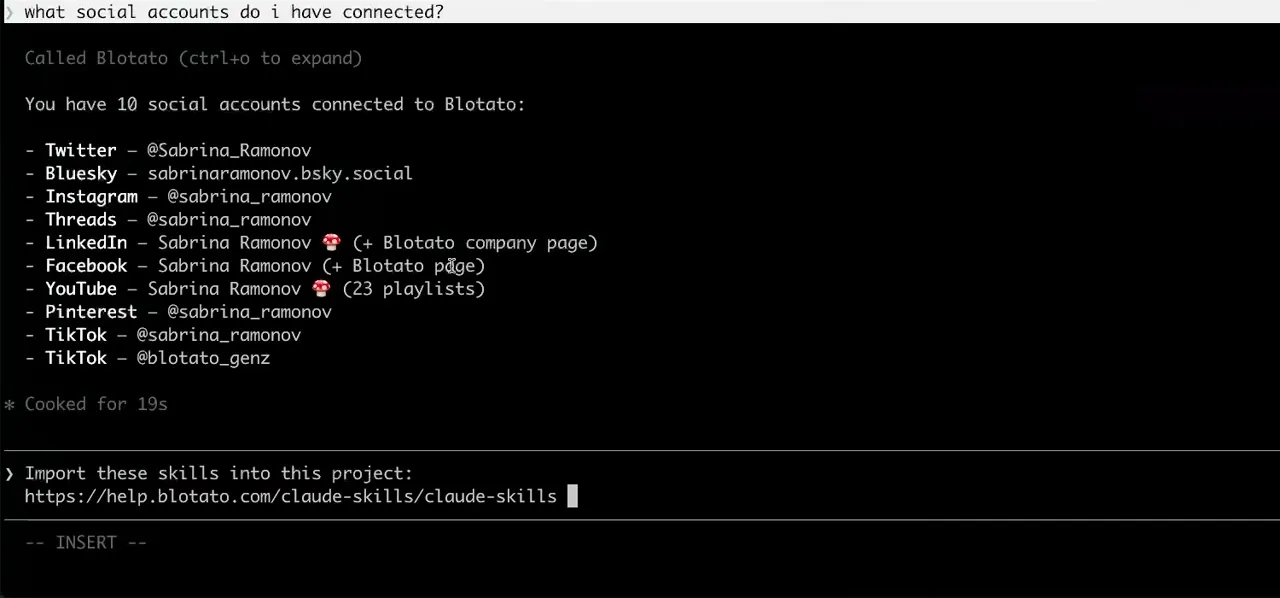
Worth knowing before you rely on it: when an agent ranks your best posts through MCP, metrics cover X, Instagram, Facebook, Threads, and Bluesky. TikTok, YouTube, and Pinterest analytics are available in the Blotato web app and REST API, and LinkedIn publishes normally but reports no metrics yet.
What to ask Grok Bot once it is connected
- Every weekday at 8am, look at what is queued for the day and fill any empty platform with something from the content folder in /workspace.
- Saved as a routine, the Bot calls blotato_list_schedules to read the queue, drafts from the files on its cloud computer, and fills gaps with blotato_create_post. The routine runs whether or not the Grok Bot app is open, and the publishing itself runs on Blotato either way.
- You handle the socials for the launch. Draft the announcement for LinkedIn and X, show me both, then schedule them for tomorrow at 9am once I approve.
- The Bot drafts, stops for your sign-off, then makes one blotato_create_post call per platform with a scheduledTime. A Require Approval rule on publishing keeps the send behind your explicit yes even when the Bot is otherwise working unattended.
- Check my Instagram comments each evening and leave drafted replies for me to approve.
- blotato_list_comments reads them and blotato_post_comment replies after you approve the wording. Instagram and Facebook are the only platforms with comment access, so the same evening routine pointed at LinkedIn has nothing to read.
What breaks, and how to fix it
Two failure modes are worth knowing here, both confirmed by Cursor staff on their forum during launch week. The first is that the connection and the OAuth discovery run from Cursor's backend rather than the machine in front of you, so a server that is not reachable over the public internet dies with a fetch failed error before any sign-in screen appears, even when the same URL works in the Cursor IDE. A hosted endpoint is already public, so this one mostly explains why a private or VPN-only config that works elsewhere fails here. The second is an early-beta bug: one hung custom remote server can take down tool discovery for every connector on the account with DeadlineExceeded errors, and the hung server can be invisible under Plugins then Yours, leaving no way to remove it yourself. Add custom servers one at a time, verify each before adding the next, and if discovery locks up, ask Cursor support to clear the stuck server. One disclosure, since this client is new: everything on this page is documented from the vendor's own docs and those staff-answered threads rather than a long production history, which is the honest state of any integration this early in a beta.
What is different about Grok Bot
Grok Bot's MCP calls never run on hardware you can see. Bots live on a persistent cloud computer, sign-in tokens for hosted MCP servers stay with Cursor's backend, and per the vendor's own docs that backend runs the tool calls on the computer's behalf, so a Bot with a scheduled routine can queue and publish posts while the app, your laptop, and your phone are all off. It is also the newest client on this list, in early beta since August 11, 2026, which is why the failure modes above come from launch-week support threads rather than years of accumulated docs. One naming trap: Grok chat at grok.com adds custom MCP connectors at grok.com/connectors, and Grok Build, SpaceXAI's coding agent, configures servers with grok mcp add. Those are different products with different config surfaces, and instructions for one do not transfer to the others.
Vendor documentation: Grok Bot MCP setup. For how a client discovers and calls tools once connected, see the MCP client concepts reference.
Grok Bot social media FAQs
01 Can Grok Bot post to social media?
02 How do I connect Grok Bot to social media?
03 How do I set up Grok Bot for social media?
04 What is the best way to manage social media with Grok Bot?
05 What goes wrong when connecting Grok Bot?
06 Does Grok Bot need to be running for a scheduled post to go out?
07 What can I ask Grok Bot to do once it is connected?
08 How much does it cost to connect Grok Bot?
Connecting a different agent?
Same endpoint, same accounts, one setup per client. The AI agents for social media hub covers what all of them share, including every tool your agent can call.









 Blotato
 Your AI Agent still can't post to social media.
Point Claude, ChatGPT, n8n, or your own agent at Blotato's MCP and that's fixed: 9 platforms behind one key, flat $29/mo.
Connect your agentFlat pricing. Cancel anytime.