Antigravity Social Media MCP Config
Google Antigravity connects to a social media MCP server by adding one JSON config with your API key in the headers, then restarting the app. The field name matters: Antigravity requires serverUrl for a remote server and does not support url or httpUrl, so a config copied from another client will not register. Antigravity shares its MCP configuration across the IDE, the CLI, and the SDK, so the server you add once is available to all three rather than needing a separate setup per surface.
https://mcp.blotato.com/mcp API key header Updated August 2026
How to connect Google Antigravity to social media
- Connect your social accounts in Blotato and copy your API key from Settings then API.
- Open ~/.gemini/config/mcp_config.json for a global server, or .agents/mcp_config.json inside a workspace to scope it to that project.
- Add the block below, using serverUrl rather than url, and paste your API key into the header.
- Restart Antigravity so the server loads.
{
  "mcpServers": {
    "blotato": {
      "serverUrl": "https://mcp.blotato.com/mcp",
      "headers": {
        "blotato-api-key": "YOUR_API_KEY"
      }
    }
  }
}
How do I know it worked?
Ask Google Antigravity to list your connected accounts. It calls
blotato_list_accounts and returns your platforms, which confirms both the connection and
the authentication in one step. If you see your accounts, setup is done.
What social media accounts do I have connected?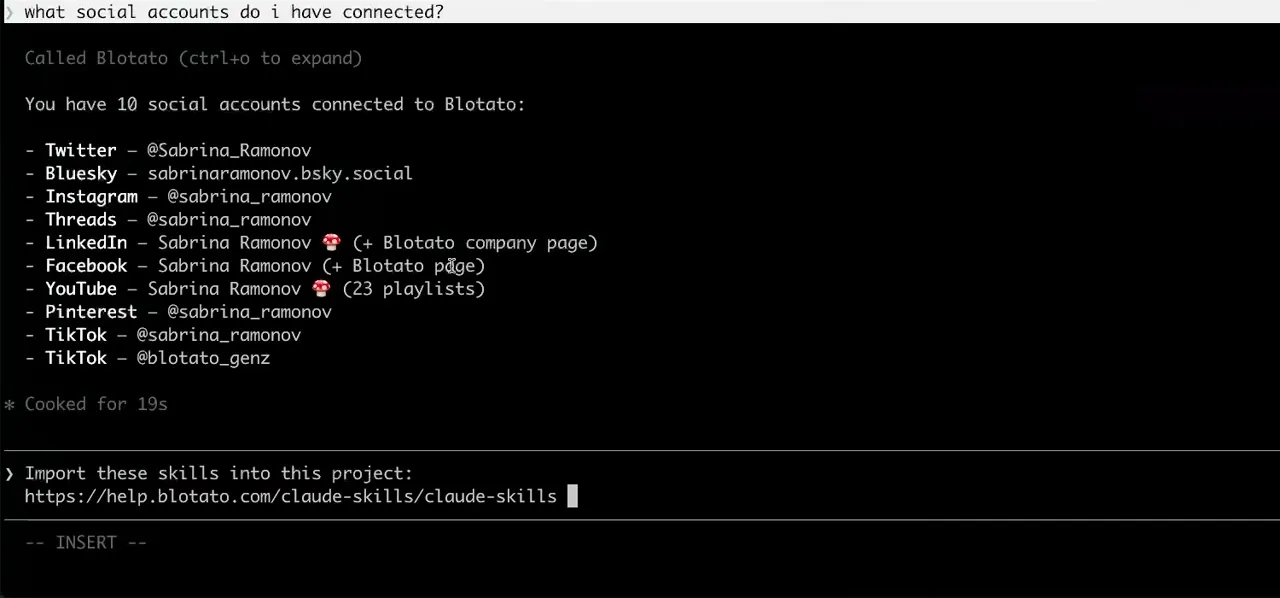
Worth knowing before you rely on it: when an agent ranks your best posts through MCP, metrics cover X, Instagram, Facebook, Threads, and Bluesky. TikTok, YouTube, and Pinterest analytics are available in the Blotato web app and REST API, and LinkedIn publishes normally but reports no metrics yet.
What to ask Google Antigravity once it is connected
- Announce this feature on all nine platforms, adjusting the copy for each.
- Antigravity drafts nine variants and makes nine blotato_create_post calls. Because the MCP config is shared, the same request works from the IDE, the CLI, or the SDK without configuring anything twice.
- Put the demo video on YouTube as unlisted first.
- blotato_create_post with privacyStatus set to unlisted, plus a title. Flipping it public later is a normal YouTube action, not something the publish call has to predict.
- Pin this to the right Pinterest board.
- blotato_list_pinterest_boards first, because a Pinterest post needs a boardId and there is no default. The agent reads the boards and picks, so you never look the ID up yourself.
What breaks, and how to fix it
The failure that catches most people here is the field name. Antigravity requires serverUrl for a remote server and its documentation states plainly that legacy fields like url and httpUrl are not supported, so a config copied from Cursor or from a generic MCP snippet registers nothing and fails quietly rather than throwing an auth error. The other common one is a plain JSON error: a missing comma between sections, or single quotes swapped in for double quotes. Single quotes are a shell and .env convention and are not valid JSON. Check the field name first, then validate the block, before assuming the key is wrong.
What is different about Google Antigravity
Antigravity is the only agent here whose MCP config is shared across three surfaces at once, so adding the server in the IDE also gives the CLI and the SDK the same publishing tools without a second config.
Vendor documentation: Google Antigravity MCP setup. For how a client discovers and calls tools once connected, see the MCP client concepts reference.
Already connected and want the workflow?
This page covers the connection. Our guide to the full Antigravity setup walkthrough covers the config in detail, an example campaign workflow, and common issues.
Google Antigravity social media FAQs
01 Can Google Antigravity post to social media?
02 How do I connect Google Antigravity to social media?
03 How do I set up Google Antigravity for social media?
04 What is the best way to manage social media with Google Antigravity?
05 What goes wrong when connecting Google Antigravity?
06 Does Google Antigravity need to be running for a scheduled post to go out?
07 What can I ask Google Antigravity to do once it is connected?
08 How much does it cost to connect Google Antigravity?
Connecting a different agent?
Same endpoint, same accounts, one setup per client. The AI agents for social media hub covers what all of them share, including every tool your agent can call.






 Blotato
 Your AI Agent still can't post to social media.
Point Claude, ChatGPT, n8n, or your own agent at Blotato's MCP and that's fixed: 9 platforms behind one key, flat $29/mo.
Connect your agentFlat pricing. Cancel anytime.